

Secure AI writing means using tools built on a no-training data policy, configurable safety filters, and verifiable encryption, so your drafts never become someone else's model fodder. The first thing to check with any vendor is whether your text trains their AI, and whether you can opt out entirely. Everything else, from encryption standards to IP protection, follows from that one answer.
TL;DR:
- Vendors should clearly state in their terms whether they train on user content, with a strict opt-out option, to ensure data confidentiality.
- On-device processing, encryption, and zero-knowledge vaults significantly reduce risks of data exposure during AI writing.
- Keeping local copies and requesting explicit contractual data clauses protect authorship and intellectual property rights against future training use.
- Deterministic middleware enforcement and label propagation improve safety by preventing malicious prompt injections and unauthorized content use.
- Inspirowrite is designed to prioritize manuscript privacy through a no-training policy, fast turnaround, and workflows that minimize exposure before final submission.
Table of Contents
- Core features that make an AI writing tool secure
- Legal and intellectual property considerations for writers using AI
- The technical architecture behind genuinely safe AI writing
- How to evaluate any AI writing tool before you trust it with a manuscript
- How Inspirowrite handles manuscript privacy in practice
- When secure AI workflows earn their place, and when they don't
- Try Inspirowrite with a low-stakes draft first
- Where to verify these claims yourself
- Sources
- FAQ
Core features that make an AI writing tool secure
The single biggest signal of a trustworthy AI writing tool is its training-data policy. Some vendors quietly retain your text to fine-tune future models unless you dig into a settings menu and opt out. Others build "no training on user data" into the product from day one, which is the standard writers and businesses handling confidential material should insist on.
Beyond that policy, a handful of technical features separate genuinely secure platforms from ones that just talk about privacy:
- On-device or ephemeral processing: text is processed and discarded rather than stored indefinitely on a server.
- Encryption in transit and at rest: look for TLS 1.3 for data moving between your browser and the vendor's servers, plus AES-256 or equivalent for anything stored.
- BYOK or zero-knowledge vaults: enterprise tiers that let you bring your own encryption key mean even the vendor can't read your content without your permission.
- Admin controls: single sign-on (SSO), role-based access, and audit logs matter enormously for agencies and publishing teams managing multiple writers.
- Configurable safety filters: platforms like Gemini let organisations set blocking thresholds per harm category, which matters if you're generating content at scale and need brand-safe outputs by default.
- Clear retention policies: how long is your text kept after processing, and can you request deletion?
Data minimisation is the quiet feature that rarely gets marketed but matters most. A tool that only processes the paragraph you're editing, rather than ingesting your whole manuscript upfront, simply has less of your work exposed at any given moment.
Pro Tip: Before subscribing to any AI writing tool, search its privacy policy for the phrase "may use your content to improve our services." If you find it without a clear opt-out, treat that as a hard no for anything sensitive.
Legal and intellectual property considerations for writers using AI
Copyright risk with AI writing tools isn't really about whether the AI "steals" your ideas. It's about whether your unpublished manuscript ends up, in fragments, inside a training dataset that shapes how the model responds to other users later. That's a subtler and more common risk than most writers assume.

Vendor claims are easy to make and hard to verify from the outside. A statement like "we don't train on your data" should be checked against the actual terms of service, not the marketing page, because the two sometimes disagree.
Practical steps that protect your position:
- Keep dated local copies of every draft before and after AI-assisted edits, so you have a clear authorship timeline.
- Use no-training or enterprise tiers for anything heading towards formal publication, agent submission, or copyright registration.
- Request explicit data-handling clauses in contracts if you're a business commissioning AI-assisted content from freelancers.
- Version your drafts so you can demonstrate the human contribution at each stage, which matters increasingly as copyright authorship questions around AI-assisted work get tested in practice.
The US Copyright Office's ongoing analysis makes clear that authorship and originality questions around AI-assisted text are still being worked out. Until that settles further, the safest posture for any writer is to treat "no training on my data" as a baseline requirement, not a nice-to-have, and to document your own creative input at every stage a lawyer might one day ask about.
The technical architecture behind genuinely safe AI writing
Most people assume an AI tool's safety comes entirely from the model itself refusing bad requests. That's only half the picture, and it's the weaker half. A model deciding on its own whether to comply with an instruction is a probabilistic judgement call, and probabilistic judgement calls can be jailbroken with the right prompt engineering.
The stronger pattern, used in frameworks like Microsoft's FIDES, is deterministic middleware enforcement. Content gets tagged with integrity and confidentiality labels before it ever reaches the model, and policy is enforced before any tool call runs, not after the model decides it's fine. If a piece of text is labelled untrusted, the system can refuse to let it trigger a side-effecting action, regardless of how convincingly it's phrased.
Three mechanisms do most of the work here:
- Label propagation: every piece of content carries a trust tag (public, private, user-identity) as it moves through the system, so downstream steps know its origin.
- Variable indirection and quarantine: untrusted content gets stored separately and referenced by pointer rather than fed directly into the model's context, which means the model never handles raw sensitive input it hasn't been cleared to see.
- Input/output safety rails: tools like NVIDIA's NeMo Guardrails run content through dedicated safety-check models before and after generation, catching harmful outputs a single model pass might miss.
Attackers have found creative ways around weaker setups. Researchers have documented cryptographic context injection, where malicious instructions get laundered through a trusted-looking context to bypass filters entirely. This is precisely why label based quarantine matters more than a single filter layer.
None of this is free. Every additional safety check adds latency and cost, and overly aggressive filters produce false positives that frustrate legitimate use. OWASP's GenAI guidance recommends treating evaluation as continuous rather than a one-off audit, because new attack patterns surface constantly. The trade-off is real: tighter guardrails slow things down slightly, but for manuscript-level confidentiality, that's usually a fair exchange.
How to evaluate any AI writing tool before you trust it with a manuscript
Run through this checklist before uploading anything you'd mind seeing resurface elsewhere.
- Training-data policy: does the vendor state explicitly, in the terms of service rather than marketing copy, that your content isn't used for training?
- BYOK availability: can enterprise customers bring their own encryption key, and is that offered as a real feature or just a sales talking point?
- On-device or redaction options: does the tool offer local processing, or automatic redaction of names and identifying details before anything leaves your device?
- Audit logs and SSO: for teams, can an admin see who accessed what, and is single sign-on supported?
- Data residency: where are servers located, and does that matter for your regulatory obligations?
- Contractual clauses: will the vendor put data-handling commitments in an actual signed agreement, not just a public policy page?
When you contact a vendor, ask directly: "Do you use customer content to train or fine-tune any model, and can you confirm that in writing?" A vague "we respect your privacy" without a specific yes or no is a red flag. So is the absence of any enterprise tier, audit logging, or admin console. If a company can't answer a straightforward question about data retention within one email, that tells you something about how seriously they treat it.
Pro Tip: If you're not ready to switch tools yet, build a simple local redaction habit: swap out character names, locations, and identifying plot details with placeholders before pasting text into any AI tool, then restore them afterwards. It takes thirty extra seconds and closes most of the exposure.
For individuals without an IT department backing them, redaction before submission and choosing a genuinely no-training tool are the two highest-value habits, well ahead of anything else on this list.
How Inspirowrite handles manuscript privacy in practice
Inspirowrite was built around one specific frustration: proofreading and translation tools that are either painfully slow or vague about what happens to your text once you hit submit. The platform doesn't use uploaded content to train its models, and sessions are handled so drafts don't linger indefinitely on a server after you're done editing.
For teams, that translates into concrete workflow choices:
- Redaction-friendly editing: run a chapter or client document through with names swapped out, then reinsert them once the corrected version comes back.
- Team access with admin oversight: business customers get shared history tracking and API access, so an editorial lead can see usage patterns without exposing raw manuscript content to everyone on the team.
- Multilingual workflows: writers translating a manuscript across languages can follow a structured multilingual content workflow rather than pasting fragments into disconnected tools.
None of this replaces a human editor's judgement, and Inspirowrite has always positioned itself as a complement to, not a substitute for, the real role proofreading plays in producing work you'd actually put your name on.
When secure AI workflows earn their place, and when they don't
Brainstorming, structural edits, and line-level style passes are low-risk territory for AI assistance. The manuscript isn't final, and a tool that never trains on your input costs you nothing there.
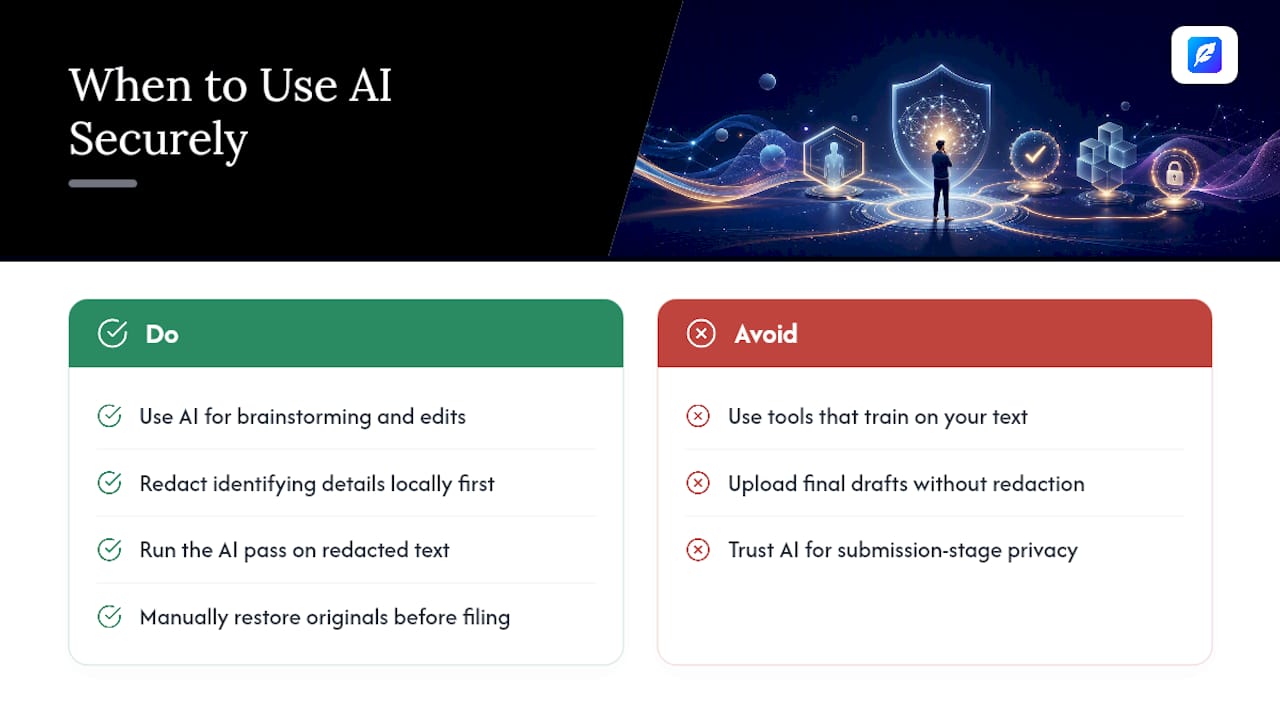
The stakes change once a draft is heading towards submission, registration, or a client handoff. That's when I'd default to a hybrid workflow: redact identifying details locally, run the AI pass, then restore the originals by hand before anything gets filed or sent. It's a small amount of friction for a meaningful reduction in exposure.
I'd treat any tool that can't clearly answer "do you train on my text?" as unsuitable for that final stage, no matter how good its suggestions are.
— Mike
Try Inspirowrite with a low-stakes draft first
Inspirowrite gives writers the thing most AI proofreading tools quietly skip: a firm no-training policy paired with fast turnaround, so speed and confidentiality aren't a trade-off you're forced to make. It suits freelance writers juggling client NDAs, students polishing dissertations, and business teams who need consistent grammar and tone checks without exposing internal documents to a black box.
Start with something low-stakes, a blog draft or an email you wouldn't mind losing, to see how the correction speed and suggestions feel before trusting it with a manuscript on platforms like Novel with AI. Business teams weighing BYOK or custom data-handling terms can request enterprise details directly rather than guessing from the pricing page. When you're ready, head to Inspirowrite and run your first document through.
Where to verify these claims yourself
For anyone who wants to check vendor claims independently rather than take a blog's word for it: Google's Gemini safety settings documentation shows how configurable thresholds work in practice. Microsoft's FIDES framework explains deterministic label-based enforcement. OWASP's GenAI Top 10 covers the broader risk landscape, and the US Copyright Office's report addresses authorship questions directly.
Sources
- Gemini API — safety settings
- Agent security with FIDES — Microsoft Learn
- OWASP GenAI — Top 10 for LLM and GenAI
- Copyright Office — Copyrightability report on AI
FAQ
What is the most secure AI to use for writing?
There's no single "most secure" AI writing tool. The most secure option for you is whichever one offers a verifiable no-training policy, encryption in transit and at rest, and, for teams, audit logs and SSO, matched to your specific risk level.
Is AI-written content detectable?
AI detection tools exist but their accuracy is inconsistent, especially after human editing. Detectability matters less for security purposes than whether the tool you used exposed your draft to third parties or training pipelines in the first place.
Which AI is best for professional or business writing?
The best choice depends on whether you need drafting, proofreading, or translation. For writers prioritising confidentiality alongside speed, a tool like Inspirowrite that explicitly commits to no training on user content is a stronger fit than general-purpose chatbots built primarily for open-ended conversation.
Are there any genuinely secure free AI writing tools?
Free tiers can be secure if the vendor applies the same no-training and encryption standards across free and paid plans, but many free tools fund themselves partly through data use. Always check the free tier's specific terms, since they sometimes differ from the paid plan's privacy commitments.