

TL;DR:
- A multilingual content workflow combines AI for high-volume drafts and human review for crucial pages. It involves stages from planning and source preparation to technical publishing and ongoing updates, emphasizing consistent terminology and best SEO practices. Inspirowrite offers private AI processing to support secure editing and translation workflows without risking data training or leaks.
A practical multilingual content workflow uses AI for high-volume drafts and human review for brand-critical pages. Start now by picking your two highest-traffic pages, choosing a private AI review path, and building a short glossary before you translate a single word. For technical publishing, follow Google's hreflang guidance and use language-specific URLs. Inspirowrite offers a privacy-first AI option that processes your text without using it to train models.
Table of Contents
- What does a multilingual content workflow look like stage by stage?
- How do you run an AI-first, human-in-the-loop translation model?
- What are the technical publishing and SEO rules for multilingual sites?
- How do you keep translations consistent across languages?
- Who does what, and how long does a typical project take?
- How do you evaluate AI tools for privacy and UK compliance?
- How does Inspirowrite support a private multilingual workflow?
- Your implementation checklist
- Key takeaways
- The part most guides skip
- Fast, private AI proofreading and translation for your multilingual workflow
- Useful sources
- FAQ
What does a multilingual content workflow look like stage by stage?
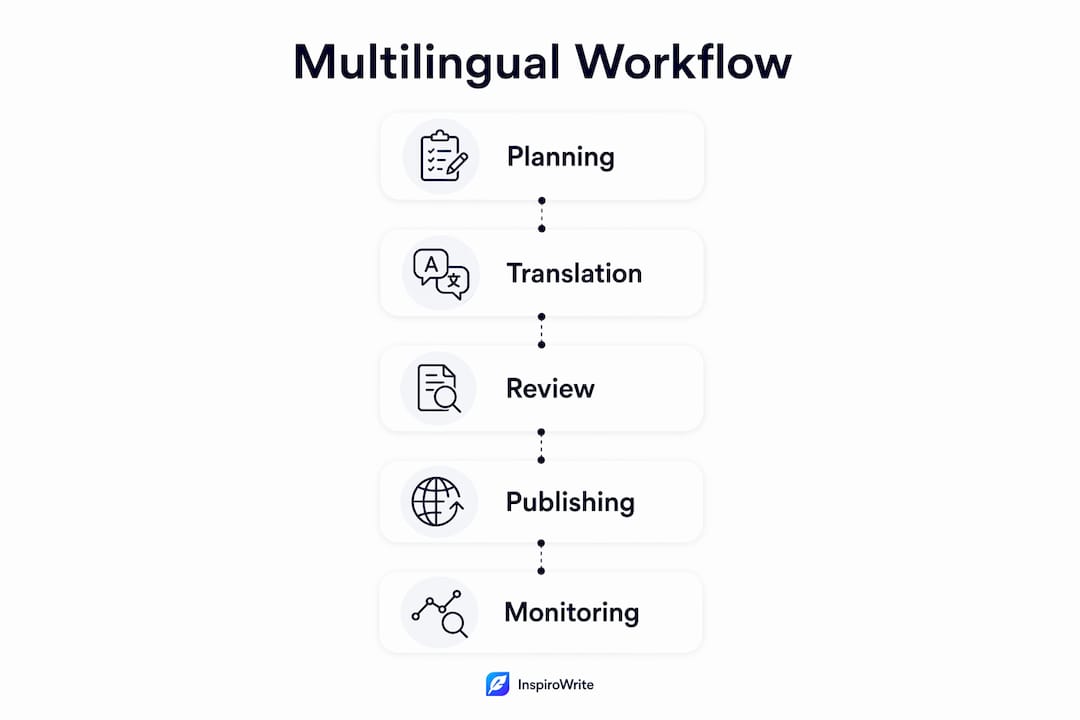
A well-run multilingual workflow moves through seven stages, each with a clear owner and output.
- Planning and market selection: decide which markets justify full localisation versus a minimum viable presence. A content owner leads this.
- Source preparation: write clean, jargon-light source copy. Ambiguous source text produces poor translations at every stage downstream.
- AI first-pass translation: run the prepared text through an AI tool for speed. A localisation project manager (PM) owns quality gates here.
- Human review and editing: a native-speaking reviewer checks tone, cultural fit, and brand terminology. This is where professional document localisation decisions get made.
- QA and linguistic testing: check for truncated strings, broken layouts, and metadata gaps before anything goes live.
- Technical publishing and SEO: a developer implements hreflang, translated slugs, and canonical tags.
- Ongoing maintenance: when source content changes, translated pages must update in sync. Without governance, multilingual site management becomes the single biggest determinant of whether localised pages stay effective.
Localisation goes beyond translation. It adapts tone, calls to action, imagery, and offers so content feels native to each market — not merely correct.
Pro Tip: Run a two-page pilot first. Your homepage and pricing page carry the highest conversion weight and reveal workflow gaps before you commit to a full rollout.
How do you run an AI-first, human-in-the-loop translation model?
The core rule: use AI for high-volume, low-risk content; route brand-critical, legal, pricing, and campaign pages to human reviewers.
| Content type | Recommended method | Typical review tasks |
|---|---|---|
| Blog posts, FAQs, support articles | AI only | Spot-check terminology |
| Product pages, landing pages | AI + light human review | Tone, CTA accuracy, SEO keywords |
| Legal pages, pricing, brand campaigns | Human-led with AI assist | Full accuracy, compliance, cultural fit |
Route decisions using a simple risk-versus-impact matrix. High-impact, high-risk content (legal, pricing) always gets human sign-off. High-volume, low-risk content (support FAQs) can go AI-only with periodic audits. The middle tier — visible commercial pages — suits an AI-first pass followed by targeted human editing.

Incorporate a translation memory (TM) and glossary into this flow. When your glossary defines approved terms, the AI uses them consistently and human reviewers spend less time correcting the same phrases repeatedly. Business jargon translation is where drift starts; a glossary stops it early.
Pro Tip: Set explicit acceptance criteria before human review begins: accuracy threshold, tone match, and presence of target-market SEO keywords. Reviewers without a brief default to personal preference, not brand standards.
What are the technical publishing and SEO rules for multilingual sites?
Use language-specific URLs and implement hreflang. That is the short answer. Here is what it means in practice.
Google recommends distinct URLs for each language version and hreflang annotations rather than browser-based automatic redirects or cookies. Subdirectories (/en/, /fr/) work well for most sites; subdomains and ccTLDs are alternatives with different trade-off profiles.
Publishing checklist:
- Choose and lock your URL structure before launch (subdirectory, subdomain, or ccTLD)
- Translate URL slugs into the target language, not just the page body
- Add
hreflanglink tags in<head>or via XML sitemap alternates - Include an
x-defaulthreflang for users whose language has no match - Set canonical tags so each language version points to itself, not the source
- Never use automatic browser-based redirects to serve language versions
A basic hreflang implementation in <head>:
<link rel="alternate" hreflang="en-gb" href="https://example.com/en/page/" />
<link rel="alternate" hreflang="fr" href="https://example.com/fr/page/" />
<link rel="alternate" hreflang="x-default" href="https://example.com/en/page/" />
Hreflang errors are one of the most common causes of underperforming localised content. Audit your configuration regularly: check that every page pair is correctly linked, no orphaned references exist, and canonical tags agree with hreflang.
For UK-targeting, set your preferred country in Google Search Console and consider UK-based CDN edge nodes for page speed. Critically, native-language keyword research per market is non-negotiable. Direct translation of English keywords rarely matches local search intent.
How do you keep translations consistent across languages?
Consistency requires three living assets: a glossary, a translation memory, and a style guide. Without them, translated pages drift apart as content updates accumulate.
A glossary defines approved translations for brand terms, product names, and regulated phrases. A TM stores previously approved sentence-level translations so they reuse automatically. A style guide per language explains how your brand voice manifests in that language specifically — not just what to say, but how to say it. Store and version all three in your translation management system (TMS) or a shared repository with change history.
Use pseudo-localisation during design to reveal layout issues before human translation begins. Inserting accented or expanded strings catches text expansion and RTL layout breakpoints early, preventing expensive redesigns later.
QA checklist before publishing any localised page:
- Linguistic review against glossary and style guide
- Contextual screenshots to catch truncated UI strings
- SEO metadata check (translated title tag, meta description, alt text)
- Pseudo-localisation pass during design phase (not just at launch)
Pro Tip: When source content changes, flag translated pages for update immediately. Pricing or feature changes that go live in English but not in French or German create trust problems fast.
Who does what, and how long does a typical project take?
Professional localisation guides recommend budgeting two to four weeks for a typical marketing site; complex web applications take longer depending on codebase integration depth.
| Milestone | Typical duration |
|---|---|
| Planning and market selection | Several days |
| Source content preparation | Several days |
| AI first-pass translation | A couple of days |
| Human review cycle | Several business days |
| QA and linguistic testing | A few days |
| Technical publishing | A few days |
| Total (marketing site) | Two to four weeks |
Role responsibilities:
- Localisation PM: owns the timeline, manages handoffs, tracks review SLAs
- Translator/reviewer: native-speaker review, glossary compliance, tone checks
- Developer/engineer: URL structure, hreflang, CMS integration, QA builds
- Content owner: approves source copy, signs off on final localised pages
Target a first human review turnaround of three business days for pages under 1,000 words. Larger pages or legal content warrants five days.
How do you evaluate AI tools for privacy and UK compliance?
Pick tools that offer private processing modes, clear data-retention policies, and contractual guarantees that your inputs will not be used to train public models. That last point matters most for proprietary or sensitive content.
Questions to ask any vendor:
- How long is submitted text retained, and can retention be set to zero?
- Is my content used to fine-tune or retrain the model?
- Is processing isolated per customer, or shared across a multi-tenant environment?
- Where are data centres located — UK, EU, or elsewhere?
- What is the legal basis for any cross-border data transfer?
- Is a data-processing addendum (DPA) available?
Privacy checklist:
- Tool processes text in isolated environments, not shared inference pools
- Vendor explicitly states inputs are not used for model training
- Encryption in transit and at rest is confirmed
- UK or EU data residency is available or contractually guaranteed
- DPA or SOC 2-equivalent evidence is provided on request
Under UK GDPR, data minimisation and purpose limitation apply to text processed by third-party AI tools. This is general information, not legal advice; confirm your specific obligations with a qualified data protection professional.
Pro Tip: Request a DPA before sending any client, patient, or commercially sensitive text to an AI tool. A vendor that cannot produce one quickly is a signal worth heeding.
How does Inspirowrite support a private multilingual workflow?
Inspirowrite processes text without using it to train AI models, which addresses the single biggest concern writers and non-native speakers raise when adopting AI tools for sensitive content.
Relevant capabilities for a multilingual workflow:
- Grammar correction, tone adjustment, and style rewriting across multiple languages
- Rephrasing, shortening, and expansion for localisation adaptation
- File upload and export so you can process full documents, not just pasted text
- API access and team controls for business customers running multi-user workflows
- History tracking so previous versions remain accessible during review cycles
A typical workflow using Inspirowrite: draft your source copy, run it through Inspirowrite in private mode for an AI-first grammar and tone pass, export the cleaned text to your reviewer, incorporate edits, then publish. The private processing step means your draft never becomes training data.
For writers and non-native speakers, the gap between a first draft and a publishable text often comes down to tone and register, not vocabulary, a challenge well addressed by platforms like novel with ai that specialise in AI-assisted creative writing. AI-assisted review closes that gap in seconds rather than days.
Inspirowrite's privacy documentation sets out its data-handling commitments in full.
Your implementation checklist
- Prioritise markets: identify two to three markets with the strongest revenue signal; assign full localisation to Tier 1, minimum viable presence to the rest.
- Prepare source templates: write source copy in plain, unambiguous language; create a style guide for each target language.
- Build your glossary: list approved translations for brand terms, product names, and regulated phrases before any translation begins.
- Integrate TMS and CMS: connect your translation management system to your CMS so source updates automatically flag translation tasks.
- Run a two-page pilot: homepage and pricing page; complete all seven workflow stages and document gaps.
- Complete QA checklist: linguistic review, screenshot checks, SEO metadata, hreflang audit.
- Publish and measure: track organic sessions per language in Google Search Console, page indexing per locale, review turnaround times, and conversion rates against your English baseline.
- Scale after pilot: once the pilot passes QA and shows indexing, extend to Tier 1 content priority list.
KPIs to track: organic visibility per language, sessions from target country and language, conversion rate versus English baseline, and time from source update to localised page update.
Key takeaways
A multilingual content workflow works when AI handles volume, humans protect quality on high-stakes pages, and living assets — glossary, TM, style guide — keep every language consistent over time.
| Point | Details |
|---|---|
| AI-first, human-in-the-loop | Use AI for high-volume content; route legal, pricing, and brand pages to human reviewers. |
| Glossary and TM are non-negotiable | Build your glossary before translating; a TM prevents terminology drift as content scales. |
| URLs and hreflang are technical musts | Use language-specific URLs and implement hreflang per Google Search Central guidance. |
| Privacy questions matter | Ask vendors about data retention, model training, and DPA availability before sending sensitive text. |
| Inspirowrite for private AI review | Inspirowrite processes text without using it for model training, suiting writers handling confidential content. |
The part most guides skip
Most multilingual workflow articles focus on tooling and skip the human failure mode: teams that build a glossary once and never update it. Six months in, the AI is translating against stale terminology, reviewers are correcting the same drift repeatedly, and nobody has ownership of the living assets.
The fix is unglamorous. Assign one person as terminology owner. Give them a quarterly review slot. Make glossary updates part of the same process as source content updates, not a separate project that gets deprioritised.
For non-native speakers specifically: your instinct to over-rely on AI for the final pass is understandable, but the tone check is where native review earns its cost. A single session with a native reviewer on your first localised page will teach you more about register and cultural fit than any tool. Do that once per new language, then use AI for subsequent drafts with confidence.
Do: start with two pages, not twenty. Don't: translate before your glossary exists.
Fast, private AI proofreading and translation for your multilingual workflow
Writers and non-native speakers working through a multilingual pipeline need one thing the big enterprise platforms rarely offer: fast, private processing without a lengthy contract or a complex setup.
Inspirowrite gives you instant grammar correction, tone adjustment, and translation across multiple languages, with processing that never feeds your text back into a training model. Upload a file, get a polished draft in seconds, export it straight to your reviewer.
Key capabilities that map directly to the workflow stages above:
- Private processing: your text is not used to train AI models
- File upload and export: handle full documents, not just pasted snippets
- Tone and style controls: formal, casual, SEO-optimised, or rephrased on demand
- API and team access: connect Inspirowrite to your existing pipeline for business use
- History tracking: keep previous versions accessible during review cycles
Review Inspirowrite's privacy commitments or start with the free plan at inspirowrite.com to see how it fits your workflow.
Useful sources
- Managing multi-regional and multilingual sites — Google Search Central: canonical reference for hreflang, URL structure, and international SEO.
- Website localisation best practices: complete guide for web applications — IntlPull: timeline expectations and milestone guidance for marketing sites and complex apps.
- Multilingual website best practices for SEO, hreflang and UX — Circle Translations: governance and TMS integration for keeping translated pages current.
- How to create a multilingual content strategy with AI — Zerpia: native-language keyword research and AI workflow guidance.
- Pseudo-locales — Android developer guide: technical reference for pseudo-localisation testing during design.
- How marketers build multilingual content strategies that scale globally — Weglot: localisation versus translation distinctions and cultural adaptation.
- Inspirowrite privacy policy: data-handling commitments for writers evaluating private AI processing.
FAQ
What is a multilingual content workflow?
A multilingual content workflow is the end-to-end process of planning, translating, reviewing, and publishing content in multiple languages, typically moving through stages from source preparation to ongoing maintenance.
When does AI translation need human review?
High-stakes pages — legal content, pricing, brand campaigns — always need human review. High-volume, low-risk content such as FAQs can use AI alone with periodic audits.
What hreflang setup does Google recommend?
Google recommends distinct URLs per language version with hreflang annotations in <head> or XML sitemaps, and advises against automatic browser-based redirects.
How long does localising a marketing site take?
Professional localisation guides recommend budgeting two to four weeks for a typical marketing site; complex web applications take longer.
How does Inspirowrite protect privacy in a multilingual workflow?
Inspirowrite processes text without using it to train AI models, offers file upload and export, and publishes its data-handling commitments in its privacy documentation.