
Cut filler phrases, restore verbs buried as nouns, and split any sentence carrying more than one idea. That single edit sequence removes most excess length without touching meaning. AI tools such as Inspirowrite speed this up, but every suggested cut still needs a human check against the original claim. The workflow below walks through both the manual moves and the tool-assisted version.
TL;DR:
- Shortening should focus on removing filler words, converting passive to active voice, and splitting sentences with multiple ideas to reduce length without losing meaning.
- Automated tools like Inspirowrite excel at detecting and trimming filler, redundancies, and nominalisations, provided you review edits especially near numbers, citations, or hedges.
- Keep longer sentences only when necessary for nuance or construction, and avoid overcorrecting long sentences in academic or rhetorical writing that intentionally use length for emphasis or clarity.
- When reviewing AI edits, compare side-by-side, accept only those that do not alter facts or qualifiers, and re-read aloud to catch any broken flow or lost connections.
- Defining abbreviations at first use and simplifying vocabulary, especially verbs and nouns, helps shorten writing effectively without sacrificing clarity or precision.
Table of Contents
- How do you shorten sentences without losing meaning?
- What's a repeatable process for shortening a paragraph?
- How do AI sentence shorteners actually work?
- When should you not shorten a sentence?
- Why Inspirowrite is built for sentence shortening
- How do you review and accept AI-suggested edits?
- How should you handle abbreviations and acronyms when shortening?
- How do you simplify vocabulary without dumbing down the writing?
- Does shortening sentences actually improve readability?
- What do real before-and-after edits look like?
- What actually moves the needle on concise writing
- Get faster, private edits with Inspirowrite
- Sources
- FAQ
How do you shorten sentences without losing meaning?
Five edits do almost all the work, and you can apply them to a single sentence in under a minute once the pattern clicks.
Remove filler words and junk phrases. Most drafts carry dead weight that adds syllables but no information. "In order to" becomes "to." "Due to the fact that" becomes "because." "At this point in time" becomes "now." None of these cuts changes what the sentence says.
Convert passive to active voice. Passive constructions force extra "to be" verbs and often bury the actual subject. "The report was reviewed by the committee" becomes "The committee reviewed the report." Four words gone, same fact, clearer actor. Reordering subject and verb this way is one of the highest-leverage single edits you can make, according to the UNC Writing Center.
Eliminate tautologies and redundant pairs. "Each and every" is just "every." "Free gift" is just "gift." "Past history" is just "history." These pairs sneak into writing because they sound emphatic, not because they add meaning.
Split multi-idea sentences. If a sentence has two verbs doing two different jobs joined by "and" or "but," it is probably two sentences pretending to be one. Splitting them doesn't just shorten each half; it makes each idea easier to hold onto.
Cut coordinating conjunctions where clauses can stand alone. Sentences stitched together with "and," "so," and "which" often work better broken apart, with a full stop doing the job the conjunction was straining to do.
- "In order to reduce costs" → "To cut costs"
- "The decision was made by the board" → "The board decided"
- "Each and every employee" → "Every employee"
- "Due to the fact that sales fell" → "Because sales fell"
Writing centres and style guides converge on the same core moves: strip filler, flip passive to active, and split compound ideas, as outlined in BYU's guide to concise writing. Ernest Hemingway's published sentences ran roughly seven words shorter than the typical prose of his era, and that gap came almost entirely from applying these same cuts relentlessly.
Pro Tip: Read a sentence aloud and stop at the first natural pause. If you'd never actually say the second half of it without taking a breath, that's usually your split point.
What's a repeatable process for shortening a paragraph?
A one-off edit fixes one sentence. A repeatable process fixes a whole document, and it works the same way every time you run it.
- Scan for multi-idea sentences. Read through once and mark any sentence doing more than one job with a highlighter or a note in the margin.
- Do a single-pass trim. Go back through and delete filler words and empty lead-ins like "it should be noted that" or "the fact that." Don't rewrite yet, just cut.
- Restore verbs. Look for nouns ending in "-tion," "-ment," or "-ance" that are hiding a verb. "Conducted an investigation into" becomes "investigated." This single habit, catching nominalisations and excess prepositional phrases, is flagged by the Naval Postgraduate School's writing centre as one of the most reliable ways to cut length without cutting content.
- Insert a few short sentences. A document full of 25-word sentences reads like a wall. Dropping in the occasional five-word sentence resets the reader's pace and pulls your average down fast, a technique Purdue OWL recommends for sentence variety generally.
- Do a final accuracy pass. Check that no number, hedge, or citation got trimmed along with the filler. This step matters more than any other on the list.
| Pass | What you're looking for | Risk if skipped |
|---|---|---|
| Scan | Sentences with two or more ideas | Run-on sentences survive the edit |
| Trim | Filler words, empty lead-ins | Word count stays inflated |
| Restore verbs | Nominalisations, weak "to be" constructions | Sentences stay clunky and long |
| Insert short sentences | Runs of uniform long sentences | Document reads flat, tiring |
| Verify | Numbers, hedges, citations | Meaning quietly changes |
This five-step order is close to what the Publication Coach guide recommends for professional editors, and it works precisely because each pass has one job. Trying to trim, restore verbs, and fact-check simultaneously is how errors slip through.
How do AI sentence shorteners actually work?
Shortening and paraphrasing are not the same thing, and mixing them up is where most AI editing goes wrong. Shortening removes scaffolding, the filler, redundant pairs, and inflated phrasing, while keeping every claim, hedge, and number exactly as written. Paraphrasing rewrites the idea in different words, which risks softening a claim or dropping a qualifier the author meant to keep. Academic and technical writers need the first, not the second.
Most shortener tools work on three heuristics: filler detection (spotting "in order to," "the fact that," and similar phrases), nominalisation reversal (turning "made a decision" back into "decided"), and redundancy collapse (catching pairs like "basic and fundamental"). Tools that report exactly what they cut, rather than silently rewriting, let you accept changes with confidence, a distinction the Proofreaderpro is built around.
Here's a concrete before-and-after:
Before: "It is important to note that, due to the fact that the budget was reduced, the marketing team was forced to make a decision regarding which campaigns would be cancelled."
After: "Because the budget was cut, the marketing team decided which campaigns to cancel."
Twenty-nine words down to thirteen. The filler ("it is important to note that," "due to the fact that") is gone, the passive construction became active, and "make a decision regarding" became "decided." Nothing factual changed.
A simple acceptance checklist keeps this safe:
- Accept filler removals automatically; they carry near-zero risk.
- Review any edit that touches a number, date, or statistic.
- Review any edit near a hedge word ("may," "suggests," "typically").
- Review any edit near a citation or attributed quote.
Favour tools that process text without using it to train future models, particularly for unpublished academic or client work where confidentiality matters.
When should you not shorten a sentence?
Not every long sentence is a problem sentence. Academic writing sometimes needs a longer clause to hold a nuanced qualification together, and cutting it into three short sentences can flatten the exact hedge the author intended. Rhetorical writing often uses length deliberately, building a long sentence toward a climax, then landing on something short for contrast. Editorial judgement matters here more than a mechanical rule, a point writing centres make explicitly when they warn against treating conciseness as an absolute goal, per UNC's conciseness guidance.
The average-length question is where most writers overcorrect. Readability research suggests documents averaging over 20 words per sentence often benefit from deliberate trimming. That's a document-wide average, not a rule for every sentence. A useful balance:
- Worry about your average if most sentences run past 25 words consistently.
- Don't worry if a handful of longer sentences sit among mostly short ones for rhythm.
- Keep at least some variety; uniform short sentences read as choppy as uniform long ones.
Why Inspirowrite is built for sentence shortening
Inspirowrite trims filler, restores buried verbs, and collapses redundant pairs while leaving hedges, citations, and numbers untouched, the exact discipline that separates trimming from paraphrasing. Processing runs fast, and content is never used to train underlying models, which matters if you're editing unpublished drafts, client work, or academic material you can't risk exposing.
- Paste your text and get suggested trims within seconds.
- Review each suggested change individually before accepting it.
- Reject anything that touches a number, hedge, or citation you want preserved.
- Export the finished version once you're satisfied with every cut.
Pro Tip: Run a paragraph through once, accept the obvious filler cuts, then re-read only the sentences flagged near numbers or quotes. That two-tier review catches nearly every risky edit without slowing you down.
How do you review and accept AI-suggested edits?
Never accept a batch of edits blind, even from a tool built to preserve meaning. The safest approach treats acceptance as its own separate step, not an automatic follow-on to generation.
Start by reading the suggested version against the original side by side, not in isolation. A trimmed sentence can look perfectly fine on its own while quietly dropping a word that changed the claim. Accept the easy category first: pure filler removal, redundant pair collapse, and empty lead-in deletion. These carry almost no risk because they remove words that added nothing.
Then slow down for the second category. Any edit touching a number, a date, a hedge word like "may" or "often," or a citation deserves a manual comparison against the source. If a sentence originally said "the trial suggested a possible improvement" and the trimmed version says "the trial showed improvement," that's not a shortening, it's a meaning change, and it should be rejected even though it's technically shorter.
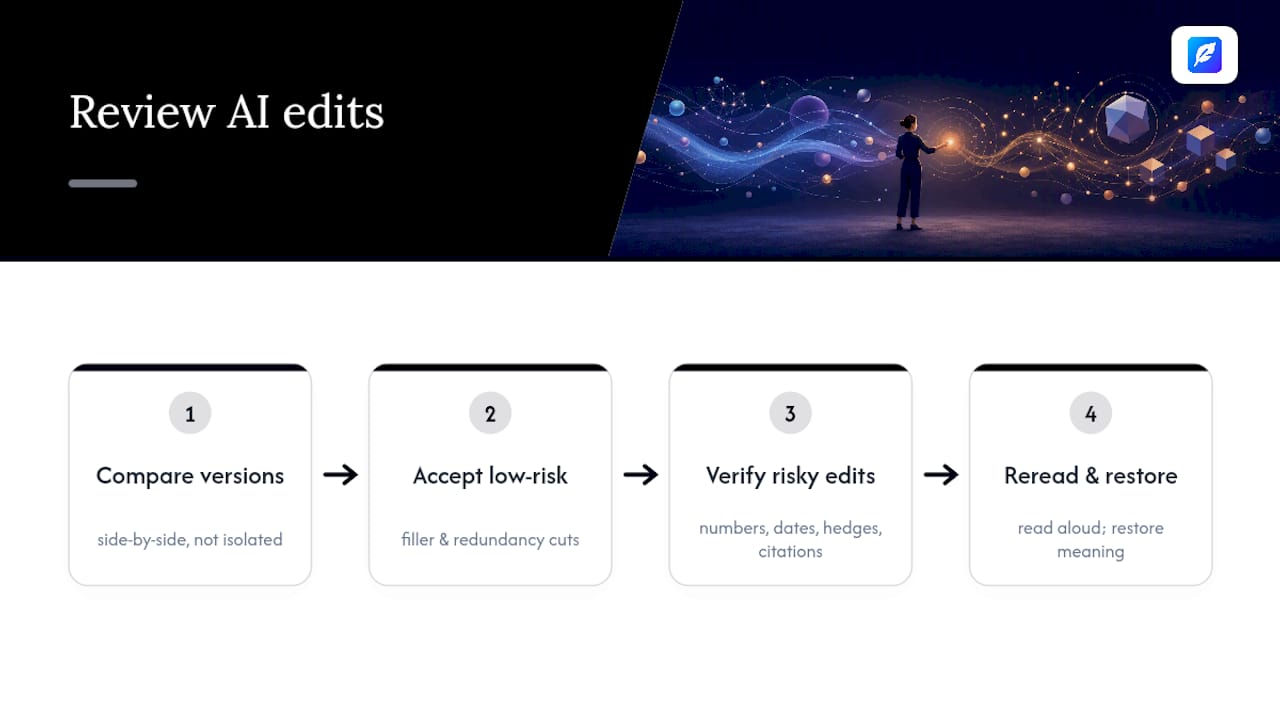
Keep a simple habit: read the final paragraph once more after accepting all your chosen edits, out loud if you can. Reading aloud catches the awkward joins and dropped connectors that silent scanning misses. If a sentence feels like it lost its thread halfway through, a cut probably went too far, and it's worth restoring a word or two even at the cost of a slightly longer sentence.
How should you handle abbreviations and acronyms when shortening?
Abbreviations shorten sentences legitimately, but only when the reader already knows the term or you've defined it first. Writing "the World Health Organization (WHO)" once, then "WHO" for the rest of the document, saves real length across a long piece without any loss of clarity.
The rule that trips people up is definition-before-use. Never open a paragraph with an unexplained acronym just because it's shorter; readers who don't recognise it have to stop and guess, which costs more time than the words you saved. Define it in full on first mention, then abbreviate freely afterwards.
Some abbreviations are safe without definition because they're more familiar than the full term: "AI," "FAQ," and "PDF" rarely need spelling out for a general audience. Others, particularly industry-specific or organisation-specific acronyms, need that first full mention regardless of how confident you are that "everyone knows it." A sentence like "the SEN team flagged the case" means nothing to a reader outside education without a prior definition.
Avoid stacking acronyms in a single sentence even when each one is individually defined. "The API integrates with the CRM via the SSO layer" is technically shorter than the spelled-out version, but three acronyms in nine words forces the reader to decode rather than read. Split that sentence or spell out at least one term to keep it readable.
How do you simplify vocabulary without dumbing down the writing?
Simplifying vocabulary is not the same as simplifying the idea. You're looking for the shortest word that carries the exact meaning, not the easiest word that carries close enough.
Start with verbs, because that's where inflated vocabulary hides most often. "Utilise" almost always means "use." "Facilitate" usually means "help" or "make easier." "Endeavour" means "try." None of these swaps lose precision; they just remove a syllable of pretension.
Nouns are the second target. Formal writing collects Latinate nouns, "utilisation," "implementation," "commencement," when a shorter word says the same thing: "use," "start." "Commencement" isn't wrong, it's just longer than the sentence needs it to be for most contexts.
Watch for stacked modifiers too. "In a manner that is efficient" is just "efficiently." "Of a serious nature" is just "serious." These constructions often creep in when writers are translating a formal register they've read elsewhere rather than saying what they actually mean.
The test that works reliably: if a colleague would use the simpler word out loud when explaining the same point to you, use it on the page too.
Does shortening sentences actually improve readability?
Shorter sentences reduce the cognitive load a reader carries while parsing a sentence, because there's less to hold in working memory before the meaning resolves. That's the mechanical reason shortening tends to improve comprehension, particularly in dense technical or academic writing where the ideas themselves are already demanding.
The effect compounds across a document. One long sentence is manageable. Twenty long sentences in a row exhaust a reader well before they finish the page, even if each individual sentence was technically clear. Readability guidance points to document-wide averages, not single-sentence rules, for exactly this reason: comprehension tracks cumulative effort, not isolated difficulty.
Comprehension gains plateau, though, once sentences get too short. A document made entirely of eight-word sentences forces the reader to reassemble relationships between ideas that a well-placed subordinate clause would have shown directly. The sweet spot isn't the shortest possible sentence; it's the shortest sentence that still shows how ideas connect.
Shortening also interacts with vocabulary difficulty. A short sentence built from dense, technical words can be harder to read than a longer sentence using plain language, because sentence length is only one input into overall readability. Cut length and simplify vocabulary together for the biggest comprehension gain, rather than treating them as separate jobs.
What do real before-and-after edits look like?
Seeing the cuts side by side makes the technique concrete in a way rules alone don't.
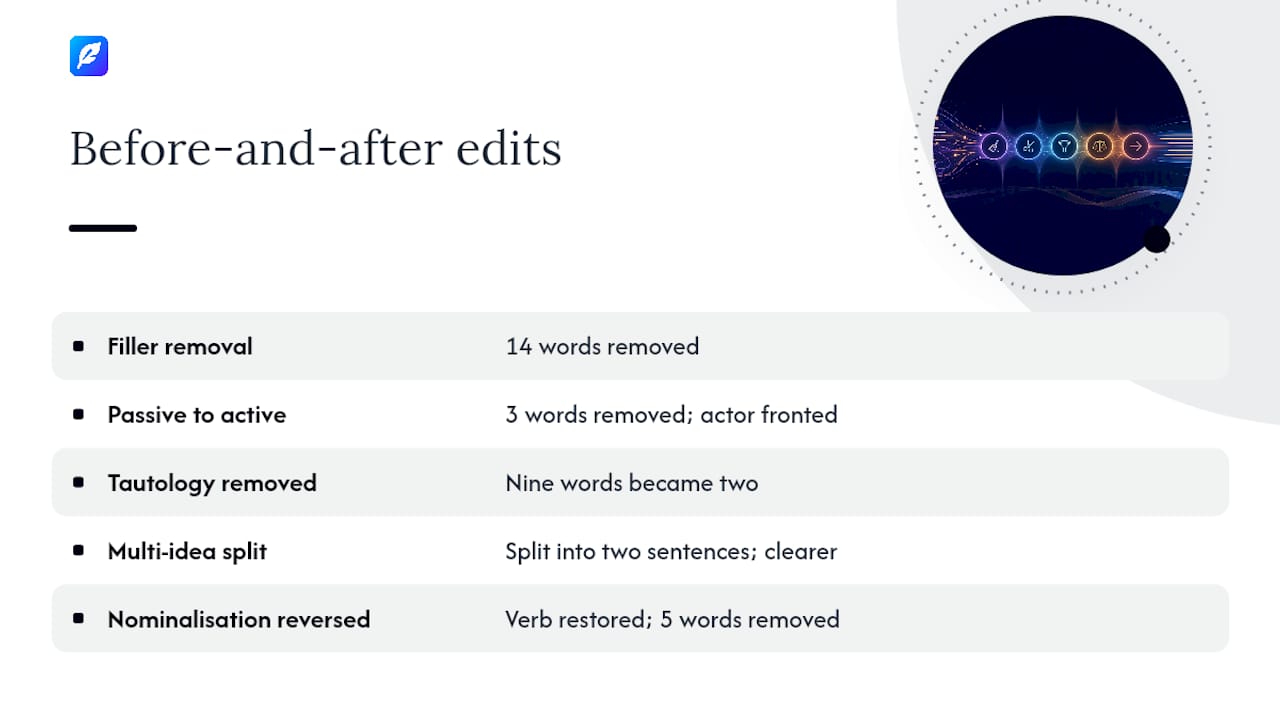
Filler removal. Before: "It is worth mentioning that the results were, in general, fairly consistent across the trials." After: "The results were consistent across the trials." Fourteen words gone, same finding.
Passive to active. Before: "A recommendation was made by the panel that the policy be revised." After: "The panel recommended revising the policy." The actor moves to the front, and three words disappear.
Tautology removed. Before: "The final outcome of the process was a complete and total success." After: "The process succeeded." This one shows how far redundant pairs can inflate a sentence: nine words became two.
Multi-idea split. Before: "The company launched the product in March, and sales exceeded expectations, which led management to approve a second production run." After: "The company launched the product in March. Sales exceeded expectations, so management approved a second production run." Same information, easier to follow, and the causal link is actually clearer once it's not buried in a chain.
Nominalisation reversed. Before: "The team conducted an investigation into the cause of the delay." After: "The team investigated the delay's cause." One restored verb, five fewer words.
Each of these keeps every fact from the original sentence intact. That's the test worth applying to your own edits: if you can't point to exactly which words you cut and confirm none of them carried information, you haven't shortened the sentence, you've changed it.
What actually moves the needle on concise writing
Most advice on concise writing focuses on the wrong metric. Word count is easy to measure and satisfying to watch drop, but it's not what readers actually notice. What they notice is whether they had to re-read a sentence to understand it. A 30-word sentence that flows in one direction is often easier to read than a chopped-up 12-word version that lost its connective logic in the split.
The conventional advice, "shorter is always better," gets this backwards. The goal is removing words that do no work, not removing words generally. That distinction is why filler and redundant pairs are safe to cut automatically, while splitting a sentence or reversing a nominalisation needs a human check every time. The mechanical cuts are nearly risk-free. The structural ones carry real risk of losing the connective tissue between ideas.
If you take one thing from this: prioritise the trim before the split. Filler removal and verb restoration get you most of the length reduction with almost none of the risk. Save sentence-splitting for the cases where a sentence is genuinely carrying two separate claims, not just a long one.
— Mike
Get faster, private edits with Inspirowrite
Manual editing works, but it's slow when you're staring down a ten-page draft and a deadline. Inspirowrite gives you the same trim-and-restore discipline covered above, applied automatically, with every suggested cut shown individually so you can accept or reject it rather than trusting a black box. Unlike sending a sensitive draft through a generic online rewriter, your text is never used to train Inspirowrite's underlying models, which matters if you're editing client work, unpublished research, or anything under a confidentiality agreement.
It suits writers who need a second pass on a near-final draft, students tightening an essay before a word-count deadline, and professionals who edit reports for a living and want the filler gone without losing a single hedge or figure. If you're weighing broader readability fixes alongside sentence length, Inspirowrite's guidance on SEO readability covers the wider picture; for education teams building AI-assisted feedback into a curriculum, Qwixl:Homework is a useful complementary resource. Paste your next paragraph into Inspirowrite and see exactly what it would cut before you commit to a single change.
Sources
- Concise writing (BYU Writing Center PDF)
- Conciseness handout (UNC Writing Center)
- Shortening sentences: a simple guide (Publication Coach)
FAQ
How do I shorten my sentences?
Cut filler phrases like "in order to" and "due to the fact that," convert passive constructions to active voice, and split any sentence that's carrying more than one idea into two separate sentences.
What is it called when you shorten sentences without changing meaning?
Editors call this "trimming," distinct from paraphrasing: trimming removes non-informative scaffolding while keeping every claim, hedge, and citation exactly as the author wrote it.
How can I shorten a text quickly?
Run it through a trimming-focused tool such as Inspirowrite to catch filler and redundant phrasing fast, then manually review any edit that touches a number, date, or qualifier before accepting it.
What are short, punchy sentences in English called?
There's no single formal term, but writers commonly call them "simple sentences" when they contain one clause, and use them deliberately to vary rhythm against longer, more complex sentences.
Is there an ideal average sentence length for readability?
Most readability guidance suggests keeping your document average under 20 words per sentence, while still allowing some longer sentences for variety and nuance.