

Use a browser-run readability checker that shows several formulas at once and highlights your hardest sentences. Paste in a short passage, check the consensus grade, then fix whatever it flags before you touch anything else. That single step tells you more about how your writing lands than a spellcheck ever will.
Key Takeaways
Consensus scoring across multiple readability formulas gives writers a more reliable revision signal than any single grade-level number.
| Point | Details |
|---|---|
| Check consensus, not one score | Run several formulas together and treat the median grade as your real signal. |
| Match formula to text type | Use SMOG for health content, Gunning Fog for jargon-heavy business writing. |
| Fix sentences before vocabulary | Shortening long sentences usually improves comprehension more than swapping words. |
| Formulas measure surface features only | They can't judge tone, truth, or whether a technical term is actually necessary. |
| Pair readability with proofreading | Inspirowrite combines multi-formula feedback with grammar and privacy-first processing in one pass. |
Table of Contents
- Why use readability checker tools in the first place?
- What do the main readability formulas actually measure?
- How do you actually run a readability check?
- What counts as a good readability score for your audience?
- How do you choose the right readability checker?
- What readability formulas can't tell you
- What's a repeatable workflow for improving readability?
- Why writers pick Inspirowrite for readability and proofreading together
- Try Inspirowrite for fast, private readability checks
- Sources
- FAQ
Why use readability checker tools in the first place?
Readability checker tools work by counting things: how long your sentences run, how many syllables sit inside your average word, how often you reach for a complex term instead of a simple one. Every established formula, from Flesch Reading Ease to the Automated Readability Index (ARI), takes those raw counts and converts them into a grade level or a reading-ease score.
The maths differs between formulas, but the inputs are strikingly similar:
- Average sentence length (words per sentence)
- Average word length (syllables or characters per word)
- The share of "complex" words, usually defined as three or more syllables
- Total sentence and word counts, which some formulas weight differently
That overlap in inputs is exactly why serious tools show you more than one score. Each formula carries its own bias. Gunning Fog penalises jargon-heavy writing harder than Flesch–Kincaid does, and ARI leans on character counts rather than syllables, which can make it steadier for technical or machine-generated text. A consensus grade across several formulas smooths out that noise better than trusting any single number.
What do the main readability formulas actually measure?
Six formulas dominate most readability checker tools, and each one answers a slightly different question.
- Flesch Reading Ease scores text from 0 to 100. Higher means easier. Scores in the 60 to 70 range are generally considered plain English, understood comfortably by most adult readers, according to the Flesch–Kincaid readability tests overview.
- Flesch–Kincaid Grade Level converts the same inputs into a US school grade. A score of 8 suggests text an average 13 to 14 year old can follow.
- Gunning Fog Index weights complex words heavily, which makes it useful for spotting jargon-stuffed business or policy writing.
- SMOG was built for healthcare and public information material, where comprehension genuinely matters for safety.
- Coleman-Liau Index relies on characters per word rather than syllables, so it tends to hold steady across inconsistent hyphenation or unusual vocabulary.
- ARI shares that character-based logic, which is one reason practitioner guidance recommends it for technical documentation.
Match the formula to the writing task. SMOG suits a patient leaflet. Gunning Fog suits a dense internal memo. For everyday web copy, the consensus across all of them tells you more than any single score.
How do you actually run a readability check?
Running a check takes minutes, and the process barely changes whether you are checking a paragraph or a full report.
- Paste your text directly, or upload a file (.txt, .md, Word, PDF) or point the tool at a live URL.
- Set your reader target, whether that is a general grade 8 audience or a technical grade 12 readership.
- Read the consensus grade first, then scan the per-sentence highlights for the lines flagged as hardest.
- Rewrite the worst two or three sentences rather than the whole passage.
- Recheck. Confirm the consensus grade moved and that no new sentence jumped into the danger zone.
Most tools that support file and URL import also offer an API for batch-checking longer documents, which matters if you are running readability across a whole site rather than one article. Watch two settings before you trust the output: the long-sentence threshold and the complex-word threshold. Both are usually adjustable, and the defaults do not suit every genre.
What counts as a good readability score for your audience?
There is no universal "good" score. There is only the right score for who is reading.
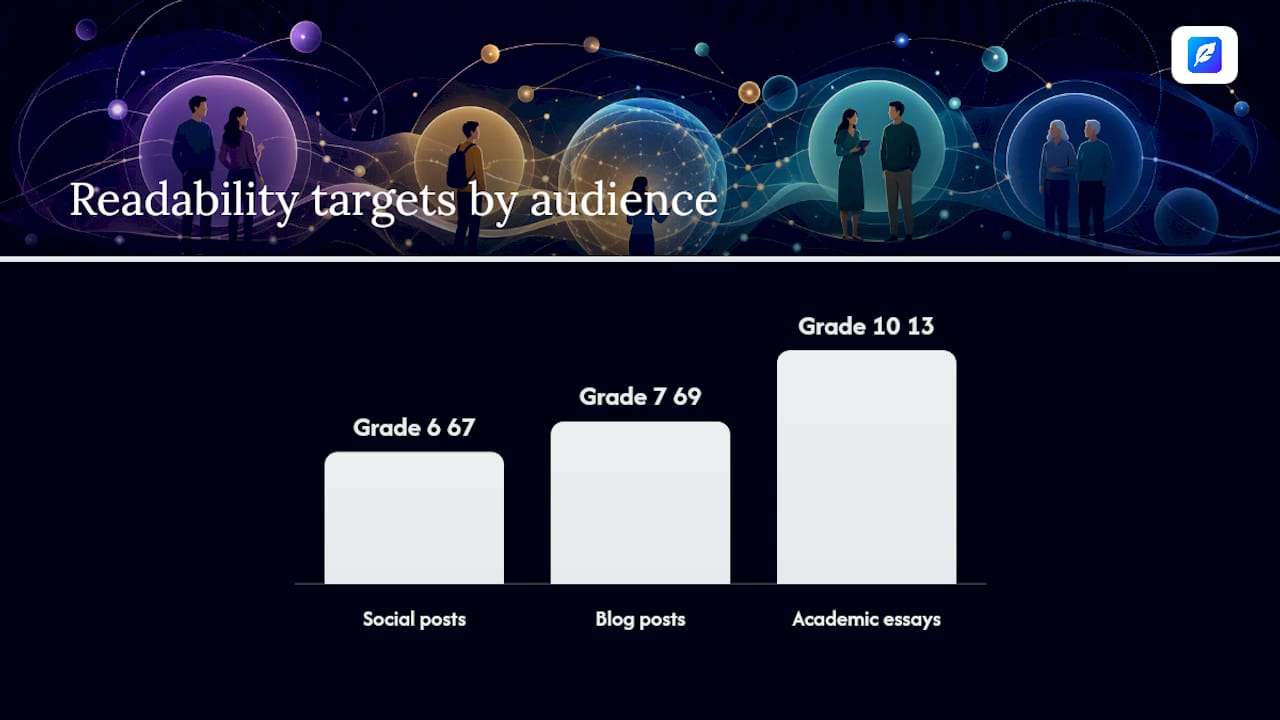
- Social posts and short-form copy: aim for Flesch Reading Ease above 70, roughly grade 6 to 7. Attention spans are short and sentences should be too.
- Blog posts and general web content: grade 7 to 9 works for most audiences, matching what widely used checkers treat as their default sweet spot.
- Academic essays: grade 10 to 13 is normal and expected. Forcing academic writing down to grade 7 often strips out necessary precision.
- Technical documentation: judge it on clarity of instruction, not a low grade number. A SMOG or Gunning Fog score in the low-to-mid teens can still be perfectly readable if the structure and terms are consistent.
Prioritise fixing sentence length before you start hunting for "simpler" vocabulary. Long, tangled sentences do more damage to comprehension than the occasional necessary technical term.
Pro Tip: Don't chase a perfect Flesch score by stripping out terms your reader actually needs. A grade 8 sentence that removes the one word explaining a legal obligation is worse writing, not better.
How do you choose the right readability checker?
Most readability checkers look similar at first glance. The differences show up once you use one daily.
- Formulas supported. One score tells you little. Look for tools running at least four to six formulas, the way ReadabilityCheck and ProseScore both do.
- Real-time highlighting. Sentence-level colour-coding, similar to what Hemingway Editor offers, turns a score into an actual editing task.
- Import options. File upload, URL scanning and API access matter once you move past checking single paragraphs.
- Integrations. Word, Google Docs and CMS plugins save you from copy-pasting every draft.
- Privacy and data handling. Ask directly where analysis runs. Tools that compute entirely in the browser never send your draft to a server at all.
- Pricing and free tier. A usable free plan should show multiple formulas, not one score behind a paywall.
Treat vagueness about data retention as a genuine red flag, along with single-formula output and no export option. If a tool cannot tell you plainly where your pasted text goes, assume the answer is somewhere you would rather it wasn't.
What readability formulas can't tell you
Formulas count sentence length and syllables. They cannot tell you whether a sentence is true, whether the tone lands, or whether a legal clause means what it says. Analyst commentary on formula limitations is blunt about this: treat the output as a diagnostic mirror, not a verdict.
Formulas also mislead on short samples, bullet-heavy slide notes, or text with unusual punctuation, since the sentence-boundary logic behind most scores assumes normal prose. A best-practice checklist keeps this in check:
- Use a consensus score across formulas rather than one number.
- Manually review every flagged sentence instead of auto-accepting suggested cuts.
- Keep technical terms your reader genuinely needs, even if they cost you a grade level.
- Test with a real reader from your target audience whenever the stakes are high.
What's a repeatable workflow for improving readability?
A readability check is only useful if it feeds into an actual editing routine, not a one-off scan.
- Run a baseline scan on the full draft and note the consensus grade.
- Sort by difficulty and pick the five worst-flagged sentences.
- Shorten and simplify those five before touching anything else.
- Re-run the check and compare the new consensus grade against the baseline.
- Finish with structural polish: headings, bullet points where they help scanning, and a pass for passive voice.
For short pieces, a browser-based check handles this fine. For longer documents or a whole content library, API-driven batch checks save the repetitive copy-paste. Either way, keep the proofreading step separate from the readability step so you're not fixing grammar and sentence length in the same pass.
Pro Tip: Read your five flagged sentences aloud before rewriting them. Awkward rhythm usually reveals hidden complexity a score alone won't show you.

Why writers pick Inspirowrite for readability and proofreading together
Inspirowrite pairs readability feedback with grammar and style correction in one pass, which matters when you are editing against a deadline rather than juggling two separate tools.
- Instant, multi-formula feedback alongside grammar and tone suggestions in the same draft.
- File upload and export, so a Word document or PDF doesn't need reformatting first.
- Team access and API options for businesses running checks across many documents.
- Processing that does not use your text to train AI models, which matters for confidential student work, client copy, or unpublished manuscripts.
Freelance writers, students under deadline, and business teams handling sensitive drafts all need the same thing: a fast answer they can trust without wondering where their text ends up.
A brief word on balancing metrics with judgement
Readability scores are a compass, not a rulebook. Chase the consensus grade that fits your actual reader, not the lowest number the tool can produce. Run a check at every major revision, not just before publishing. Treat it as one input in a longer editing conversation.
Try Inspirowrite for fast, private readability checks
Free browser calculators are useful for a one-off score, but they stop at readability. If your draft also needs grammar correction, tone adjustment, or a translation pass, you're left juggling two or three separate tools instead of one. Inspirowrite gives you readability signals alongside full proofreading in a single pass, and it never uses your text to train AI models, which matters if you're editing client work, unpublished manuscripts, or academic drafts you can't risk exposing.
Paste your next draft into Inspirowrite and see the readability grade, grammar fixes, and style suggestions together in seconds. It's a faster route from rough draft to polished text than checking readability and proofreading separately ever was.
Sources
For readers who want the underlying maths or a deeper tool comparison, a few sources are worth bookmarking.
- Free Readability Calculator — Score + Sentence Highlighter
- ProseScore — Free Readability & Content Analysis Tool
- Readability analysis and commentary (University of Illinois item)
- Readability formulas: 7 reasons to avoid them and what to do instead — UXmatters
FAQ
Is there a free tool that can check my readability score?
Yes. Browser-based calculators such as ReadabilityCheck and ProseScore offer free multi-formula scoring, and Inspirowrite includes readability alongside its free-tier proofreading features.
Is a readability score in the mid-50s good?
On the Flesch Reading Ease scale, scores below the 60 to 70 range indicate somewhat difficult text, needing more effort than plain everyday English to understand. It's not a failing score, but most general web content aims for an easier range to reach more readers comfortably.
What does a Flesch–Kincaid grade level above 14 indicate?
A Flesch–Kincaid Grade Level above 14 suggests reading difficulty comparable to advanced university level. This may suit academic or technical writing but is generally too complex for typical blog audiences, who often prefer text in the mid-to-high single-digit grade levels.
How do I turn on Flesch-Kincaid scoring in Word?
In Word, go to File > Options > Proofing, tick "Show readability statistics," then run Spelling & Grammar as normal. The Flesch Reading Ease and Flesch–Kincaid Grade Level scores appear automatically once the check finishes.