

The fastest reliable route is simple: use an instant AI proofreader for quick passes on low-stakes text, and book an expedited human editor for anything sensitive, publication-bound, or high-stakes. That's the whole decision tree. Everything else in this article just fills in the detail.
If you need a document turned around in the next few minutes, run it through an instant checker now, most catch the obvious grammar, punctuation, and consistency issues in seconds and cost nothing to try. If the stakes are higher, a job application, a manuscript, a legal or medical document, request a same-day human edit instead and pay for a guaranteed deadline. Do that today: try the instant proofreading tool for a free pass on your draft, or line up a human editor with a same-day slot if the document genuinely matters.
Key Takeaways
Fast proofreading works best as a two-tier system: instant AI tools for speed and low-stakes text, expedited human editors for anything sensitive or publication-bound.
| Point | Details |
|---|---|
| Match tier to stakes | Use instant AI tools for quick, low-stakes passes and same-day human editors for sensitive or high-stakes documents. |
| Watch pricing structure | Expect subscriptions for AI tools and per-word or per-hour rates with rush surcharges for expedited human work. |
| Confirm privacy before submitting | Check any provider's data handling policy first, especially for legal, medical, or unpublished material. |
| Stage long documents | Submit lengthy files in sections to expedited human services rather than the whole document at once. |
| Try InspiroWrite for instant, private checks | InspiroWrite offers a free instant pass with privacy-focused processing and paid plans for heavier or team use. |
Table of Contents
- How fast is fast proofreading, really?
- What does fast proofreading actually include?
- Who actually needs fast proofreading?
- What does fast proofreading cost?
- How do you spot a genuinely reliable fast provider?
- How do you get a fast, error-free result on the first try?
- Should you use an instant tool or a human editor?
- How InspiroWrite handles fast, private proofreading
- How long does the whole process actually take, start to finish?
- What can go wrong with fast proofreading?
- Is fast proofreading actually as good as standard proofreading?
- Try InspiroWrite before your next deadline
- Sources
- FAQ
How fast is fast proofreading, really?
Turnaround speed in proofreading falls into three fairly distinct tiers, and knowing which one you're actually buying matters more than most people realise.
Instant. AI-powered tools scan your text the moment you paste or upload it and return suggestions almost immediately. This tier suits emails, internal memos, social posts, first drafts, anything where you want a clean pass before you move on.
Accelerated human. Some same-day services staffed by human editors advertise a short-to-moderate document turnaround. Providers in this space commonly frame their speed around a few hours, though the exact timing depends heavily on document length and how busy the editor's queue is that day.
Standard human. This is the traditional turnaround for anything requiring careful attention, longer manuscripts, technical reports, academic theses. It costs less per word than rush work and gives an editor time to actually think about your sentences rather than just scan them.
Here's how that maps to real documents:
- A short email or LinkedIn post: instant tool, done very quickly.
- A typical blog post or cover letter: accelerated human edit, same-day delivery.
- A longer report or dissertation chapter: standard turnaround, unless you're prepared to pay a rush premium and split the file.
- A full manuscript or thesis: standard tier almost always, rushing a very large document rarely produces good results.
Pro Tip: If you have a very long document and need it fast, don't submit the whole thing at once. Break it into chapters or sections and send the most urgent part first. Most editors will prioritise a partial submission over making you wait for the whole file to clear the queue.
What does fast proofreading actually include?
Proofreading is the final polish, catching typos, punctuation slips, spacing errors, and inconsistent formatting right before a document goes out. It is not the same job as copyediting, and it's definitely not the same as a substantive rewrite. Confusing the three is the single most common reason people feel let down by a "fast" service, they expected a structural fix and got a spelling check.
| Service type | Typical scope | Realistic turnaround | Likely deliverables |
|---|---|---|---|
| Proofreading | Spelling, grammar, punctuation, consistency, minor formatting | Minutes (AI) to hours (human) | Corrected file, tracked changes, brief notes |
| Copyediting | Sentence clarity, word choice, tone, flow, style consistency | Same-day to 48 hours | Edited file with style notes, sometimes a style sheet |
| Substantive editing | Structure, argument logic, content gaps, reorganisation | Several days to weeks | Editorial letter, restructured draft, detailed feedback |
A genuine fast proofreading pass, whether from an AI tool or a rushed human editor, typically covers:
- Spelling and typo correction.
- Punctuation and capitalisation fixes.
- Basic grammar (subject-verb agreement, tense consistency).
- Consistency checks (names, numbers, formatting of headings and lists).
- Flagging, but not necessarily fixing, larger structural issues that need more time.
If you want the deeper mechanics of how proofreading fits into the broader writing process, this breakdown of proofreading's real role is worth a read before you order anything.
Who actually needs fast proofreading?
You'll recognise yourself in one of these groups almost instantly.
Students facing a submission deadline in the next few hours need an instant pass on their essay, then, if time allows, a quick human check on anything graded heavily on writing quality. A last-minute essay checklist covers this scenario in more depth.

Marketing teams publishing time-sensitive content, a product launch email, a same-day social campaign, generally run copy through an instant tool first and reserve human review for the flagship pieces.
Authors preparing query letters or submission packages to literary agents almost always need the accelerated human tier. Agents notice sloppy grammar in a first page faster than anything else, and an AI pass alone won't catch tone problems in a query letter.
Professionals sending urgent client communications, a contract cover note, a proposal due within the hour, lean on instant tools for speed, then skim manually before hitting send. Common grammatical errors that instant tools flag most often are worth knowing so you can spot them yourself when there's no time to wait even for an instant pass.
What does fast proofreading cost?
Pricing splits into two broad models, and mixing them up is how people end up paying more than they expected.
Instant tools typically run on a subscription: free tier for occasional light use, paid monthly or annual plans for regular or high-volume checking. Human proofreading and editing services, on the other hand, price per word or per hour, and expedited work almost always carries a premium.
A rough sense of the shape of pricing: a quick pass on a 1,000-word document through an instant tool costs nothing beyond your subscription (or is entirely free on a basic plan). A 2,000-word same-day human edit will cost noticeably more per word than the same job on standard 48-hour turnaround, because rush jobs get slotted ahead of an editor's regular queue.
Watch for a few things that catch people out:
- Minimum charges. Many human services apply a flat minimum fee even for a 200-word document, so a tiny job can cost disproportionately more per word.
- File-preparation costs. Scanned PDFs, oddly formatted Word files, or documents with heavy tables sometimes carry an extra charge because they take longer to process.
- Rush surcharges. Expedited human turnaround typically adds a percentage on top of the standard rate, and that surcharge grows the tighter the deadline.
If you proofread regularly, a subscription to an instant tool makes far more financial sense than paying per job every time. If you need human-level rush editing only occasionally, for a big application or a manuscript submission, a per-job purchase usually works out cheaper than committing to any ongoing plan with a human service.
How do you spot a genuinely reliable fast provider?
Speed claims are easy to make and hard to verify in the five minutes you have before you need to submit something. A short checklist saves you from picking a provider that promises same-day delivery and then quietly misses it.
- Guaranteed deadlines. Does the provider commit to a specific delivery window in writing, or just say "fast" with no number attached?
- Editor qualifications. Native-language fluency and relevant subject experience matter more for accelerated jobs, there's less time to catch errors introduced by a mismatch between editor and text.
- Refund or rework policy. What happens if the deadline slips or the edit misses obvious errors?
- Third-party reviews. Platforms such as Trustpilot give a reasonably quick way to gauge whether a provider's turnaround claims hold up in practice, and BBB listings offer a similar accreditation-style check for editorial services.
- Security badges. A visible McAfee Secure rating tells you the site has at least basic scanning and protection in place, useful shorthand when you're deciding fast and don't have time to read a full privacy policy.
When you're short on time, ask a provider three things before you commit: what's the actual guaranteed turnaround (not just "fast"), can they show a sample edit, and do they offer a confidentiality agreement for sensitive material. If a provider can't answer the third question clearly, treat that as a warning sign, particularly for legal, medical, or unpublished creative work where a leaked draft is a real problem, not just an inconvenience.
How do you get a fast, error-free result on the first try?
Rework kills the whole point of speedy proofreading. Getting it right the first time comes down to preparation more than luck.
- Clean up the copy yourself first. Remove obvious placeholder text, resolve any comments you've left for yourself, and make sure the file is in its near-final form. Editors work faster on a document that isn't still half-drafted.
- Write a short brief. Two or three lines telling the editor what the document is for, who'll read it, and any tone requirements saves back-and-forth later.
- Choose your file format carefully. Track changes in Word or a clearly annotated PDF both work well; a flat image-based PDF slows everything down and sometimes costs more to process.
- Select your turnaround tier honestly. Don't order standard-speed if you need it same-day, and don't pay rush rates if you actually have three days.
- State your priority upfront. If grammar matters more than style in this instance, say so. It focuses the editor's limited time on what you actually need fixed.
- Check the returned file properly. Look first at any author queries or flagged unresolved issues, these are the editor telling you something needs a decision only you can make, not a fault in the edit itself.
Should you use an instant tool or a human editor?
The honest answer depends on four things: how urgent the deadline is, what the document is for, how sensitive the content is, and what you're willing to spend.
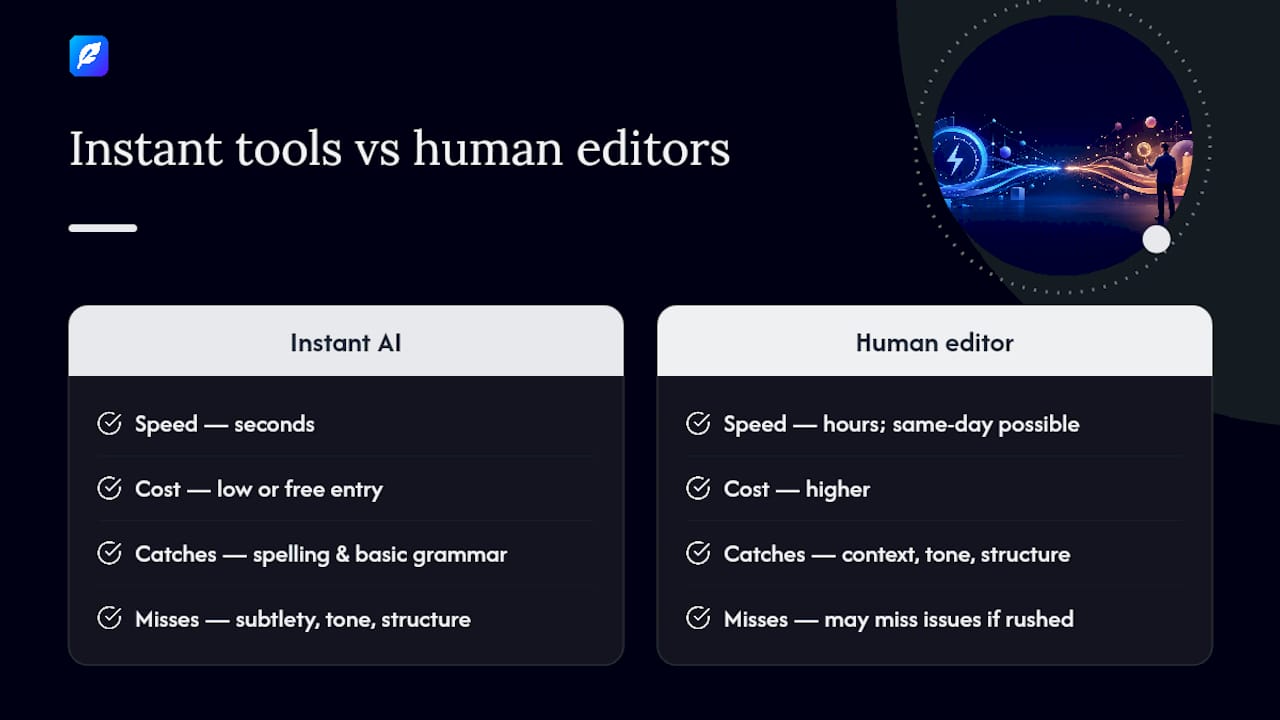
Instant AI tools win on speed and cost every time. They're available around the clock, cost little or nothing at entry level, and catch the bulk of surface errors, spelling, punctuation, basic grammar, in seconds. What they can miss is subtlety: tone that doesn't quite land, structural weaknesses, a joke that reads oddly in a formal context. AI proofreaders are genuinely fast, but they're built to catch patterns, not to judge whether your cover letter sounds too casual for the role you're applying to.
Human editors take longer and cost more, but they read for context. A same-day human edit on a job application will notice if your opening paragraph undersells your experience, something no instant tool is designed to flag.
Red flags to watch for on either route: with instant tools, over-reliance on auto-apply "fix everything" suggestions without reading what changed is a fast way to introduce new errors into a document you thought was finished. With rushed human jobs, be wary of any service that won't guarantee a revision window if the first pass misses something, a genuine same-day guarantee should include some room to flag a problem before the deadline actually hits.
For most people, a hybrid workflow beats picking one or the other. Run the instant pass first to clear out the obvious mechanical errors, then send the cleaned-up version to a human editor for the final, context-aware check. It's faster for the human editor because they're not wading through typos, and it's more thorough than an AI pass alone.
How InspiroWrite handles fast, private proofreading
InspiroWrite is built around the exact tension this article keeps circling back to: speed versus trust. The tool delivers near-instant proofreading and translation suggestions while processing your text privately, your content is never used to train its underlying models, which matters enormously if you're checking a contract, an unpublished manuscript, or client correspondence you can't risk exposing.
Core capabilities that matter for a fast workflow:
- Instant grammar, style, and tone correction with suggestions delivered in seconds.
- Privacy-focused processing that keeps your document confidential rather than feeding it into a shared training set.
- File upload and export, plus history tracking, so you can compare versions without redoing work.
- Multi-language feedback for non-native speakers and translation tasks.
- Team access with API support for business customers running proofreading across multiple writers or departments.
The plan structure is straightforward: a free tier covers quick, occasional checks, and paid Pro or Business plans unlock heavier usage, team seats, and API access for companies that need proofreading built into a regular workflow rather than used once in a while.
Choose InspiroWrite specifically when you need an instant pass on confidential material, or when a team needs the same fast check applied consistently across multiple writers. For a genuinely high-stakes document, a query package, a legal filing, pair that instant pass with a human final read, exactly the hybrid workflow described above.
How long does the whole process actually take, start to finish?
The turnaround tier you pick determines almost everything about your total timeline, not just the editing time itself.
With an instant tool, the full process from upload to finished document generally runs very quickly: upload, review suggestions, accept or reject each one, export. There's no queue, no waiting on someone else's schedule.
With an accelerated human service, the total timeline often extends beyond the advertised editing window once you account for submission, confirmation, and file return. Expect additional time for the provider to confirm your brief and slot the job into their queue, the actual editing time, and a short buffer for you to review the returned file and raise any final questions.
With standard human turnaround, the same pattern applies but usually spans several days, including submission and confirmation, the multi-day edit itself, then your review window. Documents with heavy formatting, footnotes, tables, or embedded citations typically add extra time at both ends because the editor needs to check formatting integrity.
The practical lesson: always build in a review buffer after delivery, even on an instant tool. Rushing straight from "corrected file received" to "sent" without checking a single flagged item is how errors slip through despite paying for speed.
What can go wrong with fast proofreading?
Speed introduces its own set of problems, and it's worth knowing them before you commit to a tight deadline.
Instant tools sometimes over-correct, accepting every auto-suggestion without reading the change can flatten your natural voice or introduce an error where there wasn't one. Accelerated human services, meanwhile, occasionally reduce the number of passes an editor makes on your text simply because there isn't time for a second read-through, which raises the odds that a subtle error survives to the final version. Rush surcharges can also push the price of an urgent job well above what the same document would cost on standard turnaround, catching people who didn't check pricing before submitting.
Formatting complexity is another common snag. Documents with heavy tables, footnotes, or embedded images take proportionally longer to check no matter which tier you choose, and a same-day guarantee sometimes excludes unusually complex files, so it's worth confirming that upfront rather than discovering it after submission.
Is fast proofreading actually as good as standard proofreading?
For most everyday text, yes, an instant or same-day pass catches the vast majority of the errors a standard-speed edit would catch too. The gap opens up on nuance: a rushed pass, human or AI, has less time to sit with your argument's structure, question an awkward paragraph, or catch a tonal mismatch that only becomes obvious on a slower, more deliberate read.
The trade-off isn't really about accuracy on mechanical errors, spelling and punctuation get caught either way. It's about depth of attention. A standard-turnaround human editor can flag a logical gap in your third paragraph because they had time to read the whole document twice. A same-day editor working through a stacked queue is far less likely to catch that same gap, not because they're less skilled, but because the clock doesn't allow for a second pass.
For low-stakes documents, an email, a blog draft, an internal memo, that gap almost never matters. For anything where structure and nuance genuinely affect the outcome, a funding application, a manuscript, a legal document, it's worth weighing whether the time saved is worth the risk, and whether a hybrid approach closes that gap without costing you the deadline.
A practical workflow that actually works
My honest view, after seeing how these tiers actually perform against each other, is that the AI-first, human-final workflow is underused. Most people either trust an instant tool completely and skip the human check entirely, or they distrust AI tools altogether and pay full rush rates for a human editor to fix typos a machine would have caught in five seconds. Neither makes much sense. Run your draft through an instant checker to strip out the mechanical noise, then send the cleaned version to a human editor for the read that actually needs a person, tone, structure, the things a pattern-matching tool wasn't built to judge. Just don't let speed talk you out of checking the returned file properly. A five-minute review buffer costs you nothing and catches the one thing that shouldn't have slipped through.
Try InspiroWrite before your next deadline
InspiroWrite gets you a corrected draft back in seconds, not hours, and your document stays private the entire time, it's never used to train the underlying AI model. There's a free tier for occasional quick checks, so you can test the instant pass on your own text before deciding whether a paid plan makes sense for regular use.
If you've got a deadline in the next few minutes, try the instant proofreader now and see how much it catches on a first pass. For teams that run proofreading across multiple writers, the Business plan adds API access and shared history tracking, worth a look if fast, confidential checking needs to happen more than once a week.
Sources
A handful of external checks help you verify a provider's speed and reliability claims without spending your whole afternoon researching.
FAQ
Can ChatGPT do proofreading?
General-purpose AI chatbots can catch obvious grammar and spelling errors, but they weren't built specifically for proofreading and can miss consistency issues or introduce unwanted rewrites. A dedicated proofreading tool built for that single task, rather than general conversation, tends to give more reliable, less intrusive corrections.
How long does it take to proofread 50,000 words?
At standard human turnaround, a full manuscript or thesis typically takes several days, editors need time to read closely rather than skim. Splitting the file into sections and submitting the most urgent parts first is the practical way to get partial feedback faster.
Is AI replacing human proofreaders?
Not entirely. AI tools handle mechanical errors, spelling, punctuation, basic grammar, almost instantly, but they can miss subtler tonal and structural issues that a human editor catches on a careful read. The two roles increasingly work best together rather than as replacements for one another.
Is there a free AI proofreader available?
Yes. InspiroWrite offers a free tier that lets you run an instant proofreading pass on your text before deciding whether a paid plan suits your regular volume. It's a reasonable way to test speed and accuracy on your own document before committing to anything.