

TL;DR:
- Professional English emails must follow a clear, seven-part structure to ensure clarity and purpose.
- Using the appropriate tone and formalities helps build trust and prevents confusion in professional communication.
A professional English email is a structured, purposeful message that respects the reader's time and states its intent without ambiguity. The term "professional email writing" covers everything from tone and word choice to layout and sign-off. Getting these elements right determines whether your message is read, acted on, or ignored. This article covers the seven-part structure every effective email needs, how to calibrate your tone for different situations, a practical drafting process, and the most common mistakes that quietly undermine credibility.
What are the essential components of a professional English email?
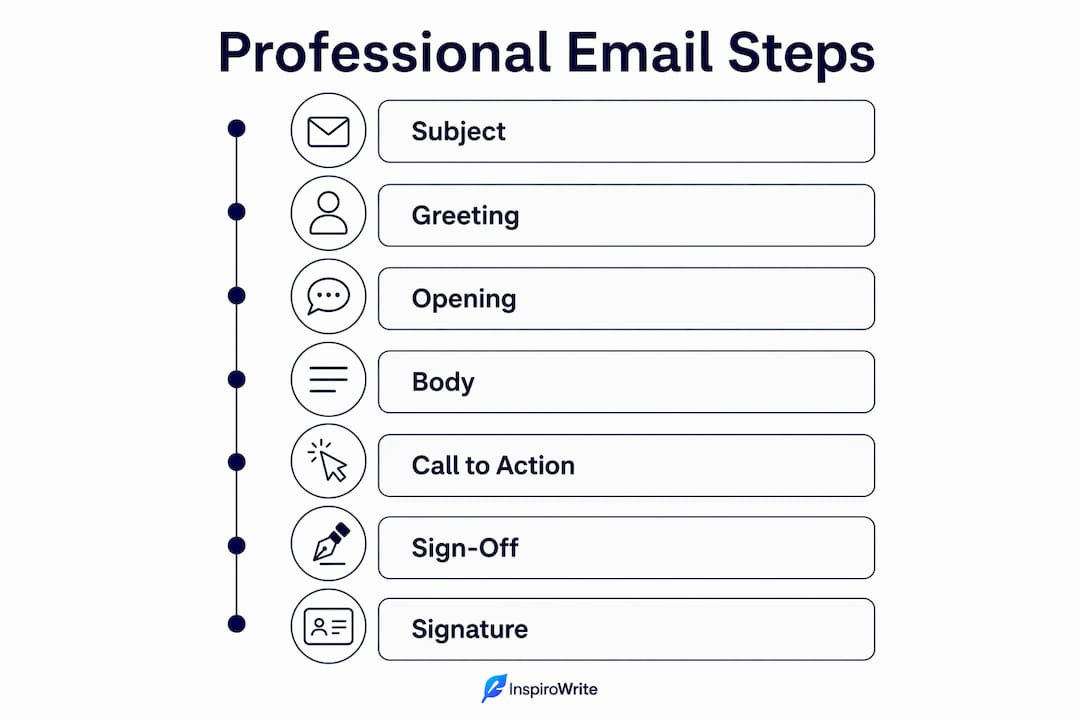
The gold standard for professional email structure includes seven components: subject line, greeting, opening statement, body, call to action, sign-off, and signature. Each part carries a specific job. Remove one and the email becomes harder to read or act on.

Subject line
Keep it to 6–8 words and under 60 characters. That length fits on a mobile screen without being cut off. Vague subject lines like "Quick question" or "Following up" reduce open rates because they give the reader no reason to prioritise your message. Specific ones like "Invoice 1042 due 15 March" do the opposite.
Greeting and opening
Match the greeting to your relationship with the recipient. "Dear Ms Johnson" works for a first contact or formal context. "Hi Sarah" is fine for an established colleague. The opening line should state your purpose immediately. "I'm writing to request approval for the Q2 budget" is far more effective than "I hope this email finds you well."
Body, call to action, and sign-off
Keep the body to 50–125 words and one main idea per email. If you have three separate requests, send three separate emails or use a numbered list. Your call to action must be specific: state what you need and by when. "Please confirm by Friday 14 March" is clear. "Let me know when you can" is not. Close with a simple sign-off. "Kind regards" or "Best" suits most professional emails. Reserve "Yours sincerely" for formal letters and official correspondence.
Signature
Your signature should include your full name, job title, company, and at least one contact method. Keep it to four lines. A cluttered signature with social media icons and motivational quotes reads as unprofessional.
Pro Tip: Write your subject line last. Once the body is complete, you know exactly what the email is about and can summarise it in one sharp line.
How do you adjust tone and formality in professional emails?
About 80% of professional emails benefit from a semi-formal tone, using sign-offs like "Kind regards" or "Best." That leaves a much smaller slice of communication that genuinely requires stiff, formal language. Knowing which register to use is one of the most underrated skills in business email etiquette.
The three registers work as follows:
- Formal: First contact with a senior external stakeholder, legal correspondence, HR matters, or any situation where you do not know the recipient. Use "Dear [Title Surname]," avoid contractions, and close with "Yours sincerely" or "Yours faithfully."
- Semi-formal: The default for most workplace emails. Use the recipient's first name, write in plain sentences, and close with "Kind regards" or "Best regards."
- Informal: Appropriate only with close colleagues you communicate with daily. Short messages, first names, and casual sign-offs like "Cheers" are acceptable here.
The most common error is mixing registers within a single email. Opening with "Hi Dave" and closing with "Yours faithfully" sends a confused signal. Stick to one register throughout.
Overly formal or outdated phrases create distance rather than connection. "Dear Sir/Madam" sounds dated when you know the recipient's name. "Please do not hesitate to contact me" is a phrase most readers skim past without registering. Replace it with "Feel free to call me on the number below."
Non-native speakers often default to formal language because it feels safer. The result is emails that sound stiff with familiar contacts, which can read as cold or even passive-aggressive. If you have exchanged ten emails with someone, "Hi [Name]" is not disrespectful. It is appropriate. Learning to write naturally in English is a skill that develops with practice and honest feedback.
How do you draft, review, and send a professional email?
A reliable process removes guesswork and reduces errors. Follow these steps every time.
- Draft the body first. Start with what you need to say, not how you want to open. Write the main point in the first sentence of the body. Everything else supports it.
- Write a specific subject line. Once the body is done, summarise the email's main request or information in 6–8 words. Avoid generic phrases.
- Use short paragraphs. Break text into blocks of two to four sentences. Dense paragraphs slow reading and bury key information.
- State one clear call to action. Specify what you need and by when. If you have multiple asks, number them so nothing is missed.
- Proofread before sending. Read the email aloud. Your ear catches errors your eye misses. Check spelling, grammar, and tone. Emails over 300 words are generally too long. If yours exceeds that, cut it.
- Get a second opinion on critical emails. Before sending a message to a senior client or in a sensitive situation, ask a colleague to read it. A fresh pair of eyes spots tone problems you cannot see yourself.
- Check the recipient field last. Add the recipient's address as the final step. This prevents accidental sends while you are still drafting.
Pro Tip: If you feel uncertain about the tone of a critical email, paste it into Inspirowrite before sending. It checks grammar, style, and clarity in seconds, without storing your content.
Structure matters more than vocabulary complexity for whether an email gets read and acted on. A well-organised email with simple words outperforms a dense, impressive-sounding one every time. Knowing how to proofread your own writing is a skill worth building deliberately.
What mistakes undermine professional English email writing?
Most email errors fall into a small number of repeating patterns. Recognising them is the first step to fixing them.
- Vague or overlong subject lines. "Checking in" tells the reader nothing. "Approval needed: project brief by 20 March" tells them everything. Subject lines are the first filter recipients use to decide whether to open your message.
- Mixing formal and informal language. Opening with "Hi there" and signing off with "Yours faithfully" creates a jarring inconsistency. Choose a register and hold it throughout.
- Burying the main point. Many writers spend two paragraphs on context before stating what they actually need. Put the purpose in the first or second sentence of the body.
- Using outdated phrases. "Dear Sir/Madam" sounds dated when you know the recipient's name. "As per my previous email" reads as passive-aggressive in most contexts. Cut these phrases entirely.
- Sending without proofreading. Spelling and grammar errors signal a lack of care. They undermine credibility regardless of how strong the content is. Non-native speakers benefit from reviewing common grammar mistakes before finalising important messages.
- Overloading with multiple requests. Using multiple commands in a single email dilutes each one. If you must include several asks, number them clearly. Avoid "Thanks in advance" as a substitute for a clear, explicit request.
Clear, direct, and respectful language ensures quick understanding. That is the standard every professional email should meet.
Key takeaways
Writing professional English emails well requires structure, appropriate tone, and careful proofreading, not complex vocabulary or formal language.
| Point | Details |
|---|---|
| Use the seven-part structure | Subject line, greeting, opening, body, call to action, sign-off, and signature each serve a distinct purpose. |
| Default to semi-formal tone | Around 80% of professional emails work best with "Kind regards" or "Best" as a sign-off. |
| State your purpose early | Put the main point in the first or second sentence of the body, not at the end. |
| Proofread every email | Read aloud before sending; emails over 300 words are generally too long and should be cut. |
| Match formality to relationship | Using "Dear Mr Smith" with a long-standing colleague reads as cold; "Hi [Name]" is usually more appropriate. |
Why clarity beats formality every time
My honest view, after years of writing and reviewing professional emails, is that most people overcomplicate this. They reach for formal language because it feels safer, more authoritative. What it actually does is slow the reader down and create distance.
The emails I have seen get the fastest, most useful responses share one quality: they make it effortless for the recipient to understand what is needed and respond. That comes from structure and clarity, not from impressive vocabulary. Confusing professional tone with complexity is one of the most persistent mistakes I see, particularly among non-native speakers who have been taught that formal equals professional.
Tone calibration matters more than most guides admit. An email that is too formal with a familiar contact does not just sound odd. It can genuinely damage the relationship by signalling distance or displeasure. Getting this right builds trust faster than any carefully chosen phrase.
The other thing I would stress is proofreading in an era where AI-generated text is everywhere. A human-sounding, error-free email is a professional advantage precisely because it is less common. Clear communication that feels human is increasingly rare and increasingly valued. Treat every email as a small representation of your professional standards.
— Mike
How Inspirowrite helps you write better professional emails
Writing a polished professional email takes practice, but you do not have to do it alone.
Inspirowrite is an AI-powered proofreading tool built for exactly this kind of work. Paste your draft email and receive instant feedback on grammar, tone, and clarity, all without your content being stored or used to train any AI model. That privacy guarantee matters when your emails contain sensitive business information. Inspirowrite suits non-native speakers and experienced professionals alike, catching the errors that slip past a tired eye. You can review the terms of service and privacy practices before you start, so you know exactly how your data is handled. Better emails, faster, with full confidence in your privacy.
FAQ
What is the ideal length for a professional email?
Professional emails should stay under 300 words. Longer messages reduce the chance of a prompt, complete response.
Which sign-off is best for most professional emails?
"Kind regards" or "Best" suits approximately 80% of professional email contexts. Reserve "Yours sincerely" for formal or official correspondence only.
How do you write a good email subject line?
Keep the subject line to 6–8 words and under 60 characters. Make it specific to the email's main request or information, not generic.
Should non-native speakers use formal language to sound professional?
Not by default. Overly formal language with familiar contacts can read as cold or distant. Semi-formal, clear phrasing is more effective for most professional situations.
How can you improve your professional email writing quickly?
Proofread every email before sending, use the seven-part structure consistently, and get feedback on tone from a tool like Inspirowrite or a trusted colleague.