

Run spellcheck, read the caption aloud, then do a 30-second link and handle check. That trio catches the vast majority of embarrassing errors in under two minutes, and it works whether you're posting one caption or twenty a week. Everything else, the platform quirks, the tone checks, the team workflows, exists to make that core routine faster and harder to skip.
TL;DR:
- Run a spellcheck but ensure all suggestions are carefully reviewed to prevent incorrect autocorrections, especially for brand names or slang.
- Use reading aloud or text-to-speech to identify missing words, awkward phrasing, and sentences that don't flow naturally when spoken.
- Verify all links, handles, and hashtags in the draft preview to prevent broken URLs and incorrect tags before posting.
- Implement a three-pass editing process focusing on clarity, correctness, and tone to catch nearly all errors efficiently.
- Always check platform-specific features, such as editable elements after posting and content policies, to avoid reputational or compliance issues.
Table of Contents
- The quickest social media proofreading tips that actually work
- How to run a ruthless three-pass edit for captions
- Platform-specific checks before and after you publish
- Common social media errors and their one-line fixes
- Building a pre-publish workflow your whole team can follow
- When to trust AI editing tools, and when a human still has to look
- Checking your posts against platform content policies
- Getting collaborative proofreading right on a team
- A tiny habit that saves reputation and ad spend
- A faster first pass without handing over your drafts
- Sources
- FAQ
The quickest social media proofreading tips that actually work
Most errors on social posts aren't complicated. They're small, repeatable slips that a fast, structured pass catches almost every time. Here's the order that works, ranked by how much damage each mistake tends to cause versus how long it takes to fix.
- Run spellcheck, but review every suggestion. Autocorrect loves swapping brand names and slang for "corrections" that are wrong. Read what it changed before accepting.
- Read the post aloud, or use text-to-speech. Your eyes skim; your ears catch missing words, clunky rhythm, and sentences that don't actually make sense when spoken.
- Scan for homophones and confusables. "Your" versus "you're," "its" versus "it's," "affect" versus "effect." These pass spellcheck every time.
- Confirm every @handle and hashtag points where you think it does. Tap through in the draft preview rather than trusting memory.
- Verify all CTA links open the right page. A 404 on a boosted post is money wasted, not just a typo.
- Check punctuation around numbers, dates, and offers. "Save 20%, this weekend only" reads differently from "Save 20% this weekend only." Punctuation changes what you're actually promising.
- Keep emojis purposeful and check mobile line breaks. An emoji that looks fine on desktop can shove your CTA onto a second line on a phone.
- Trim filler words. Just, really, actually, very. Cut them and the sentence usually gets stronger, not weaker.
- Put the payoff in the first line. Feeds truncate captions, so if the point is buried in line three, most readers never see it.
- For scheduled or boosted posts, double-check baked-in text on images. Once that creative goes live, overlay text can't be edited, only replaced.
Pro Tip: Keep a running "confusables" list of the specific words you personally mix up, your/you're, lose/loose, whichever ones trip you, and scan for just those before every post. It's faster than proofreading from scratch every time.
How to run a ruthless three-pass edit for captions
A single read-through catches maybe half your errors. A three-pass edit, clarity, correctness, then rhythm, catches nearly all of them, and each pass takes under a minute once you know what you're looking for.
- Pass 1, clarity (about 30 seconds): Put the payoff first. Delete any throat-clearing opener ("We're so excited to announce..."). Split any sentence that makes you take a breath halfway through.
- Pass 2, correctness (about 45 seconds): Run spellcheck, fix homophones, verify every handle and link. Screenshot the caption or preview it on your device to catch line-break surprises before they happen.
- Pass 3, voice and rhythm (about 30 seconds): Read it aloud. Check that sentence lengths vary rather than plodding along at the same pace. Confirm the tone still sounds like your brand, not like a template.
Add a tiny tickbox for each pass to your content calendar. It turns a vague "proofread this" instruction into three concrete, timed steps anyone on the team can follow.
Platform-specific checks before and after you publish
What you can fix after posting depends entirely on the platform, and knowing the difference saves you from panicking over something correctable or, worse, leaving something broken because you assumed it wasn't.
- Instagram: Captions, tags, location, and alt text can all be edited after publishing, and hashtag indexing refreshes within minutes. The photo or video itself cannot be swapped. Draft captions in plain text and paste them in to avoid unexpected line-break issues, especially on iOS.
- X: Check threading order and link previews before posting; test how the link card renders, since it can crop titles awkwardly.
- LinkedIn: Tone and length matter more here than almost anywhere else. The first line decides whether the post gets seen in the feed at all.
- TikTok: Text burned into the video is permanent. Preview on an actual device and check subtitles and overlays before you tap post.
If the mistake is baked into the creative itself, a burned-in typo on a TikTok video, a wrong number on an Instagram graphic, editing the caption won't save it. Delete and repost. If it's just text (a caption, a tag, a link), edit it in place.
Common social media errors and their one-line fixes
Most proofreading failures repeat across accounts and teams. Once you know the pattern, you can catch it in seconds rather than minutes.
- Missing or repeated words: Read in fragments rather than full sentences; your brain autocorrects skipped words when reading normally.
- Homophones and confusables: Keep a short list of your own frequent offenders and scan for just those.
- Broken CTAs and wrong landing pages: Open every link in an incognito tab before scheduling, so you see exactly what a stranger would see.
- Incorrect or unverified handles: Tap through from the draft preview to confirm you're tagging the actual account, not a lookalike.
- Tone drift: Hold the draft next to a recent on-brand post before you schedule. If it doesn't sound like the same account, it needs another pass.
Proofreading social content goes well beyond spelling. Broken links and tone mismatches cause just as much reputational damage as a typo, sometimes more.
Building a pre-publish workflow your whole team can follow
Consistency matters more than talent here. A team that follows the same three-minute process every time will beat a team of great writers with no process at all.
- Assign one final approver. A single person runs the BLUF check before anything goes live, no exceptions.
- Use a shared checklist in the content calendar and preview every post on an actual phone screen, not just a desktop editor.
- Consolidate feedback into one document. Scattered comments across Slack, email, and text messages guarantee something gets missed.
- Lock the creative for paid posts and run a separate ad-proof pass. A typo on an organic post is embarrassing; the same typo on a boosted ad costs real money while it runs.
A centralised approval process with one final decision-maker measurably reduces error rates compared with a free-for-all where everyone edits and nobody owns the final check.
When to trust AI editing tools, and when a human still has to look
AI tools are genuinely good at grammar, clarity, and speed. They're far faster than a human at catching a dangling modifier or an inconsistent verb tense across fifty captions. What they're not reliably good at is knowing your brand voice, catching a factual error about your own product, or confirming that a link actually goes where it should.
The strongest workflow uses AI for the first pass and a human for the final read-aloud and link check. That split plays to each side's strengths: speed from the machine, judgement from the person. A tool like Inspirowrite fits neatly into that first stage, running fast, keeping the input private rather than feeding it into a shared training set, and handing you a cleaner draft to finish by hand.
Pro Tip: For anything sensitive, client names, pricing, legal claims, keep a quick record of who approved the final version and when. It takes ten seconds and saves an argument later.
Checking your posts against platform content policies
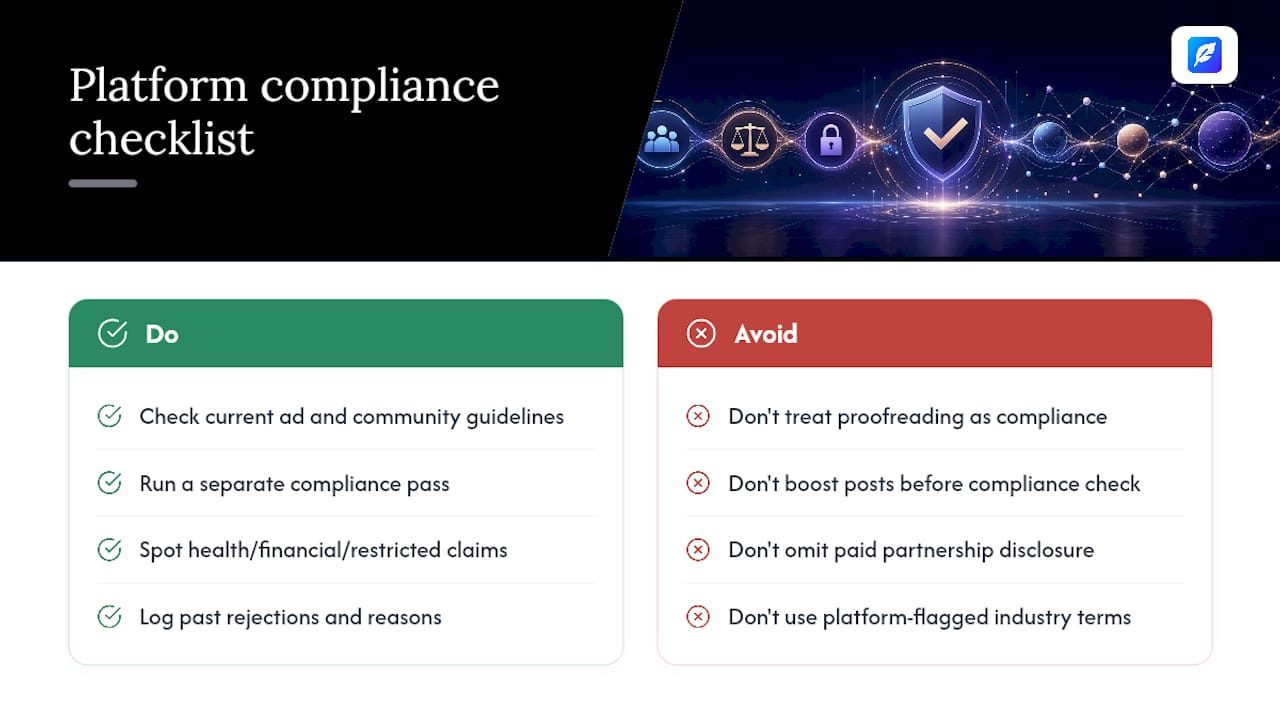
Every major platform has its own rules about what content can run, and those rules shift often enough that a caption that was fine last quarter can trip a filter this quarter. Before you schedule anything, glance at the platform's current advertising and community guidelines, particularly around health claims, financial promises, and restricted categories like alcohol or gambling.
The proofreading pass and the compliance pass are different jobs, and treating them as one step is how violations slip through. A caption can be grammatically perfect and still get a post removed for an unapproved claim, a missing disclosure, or a banned word in a regulated category. Build a second, short check into your workflow specifically for policy language: does the post make a claim it can't back up, does it need a paid partnership disclosure, does it use a term the platform flags for that industry.
This matters most for boosted or paid content, since ad review systems are stricter than organic feed moderation and often catch things a casual read-through misses entirely. A post that would sit quietly as organic content can get rejected or flagged the moment money is behind it. Keep a running note of past rejections and why, most accounts see the same two or three issues repeat, and that short list becomes its own mini-checklist for future posts. Reviewing platform help pages every few months is worth the ten minutes it takes, because rules genuinely do change without much fanfare.
Getting collaborative proofreading right on a team
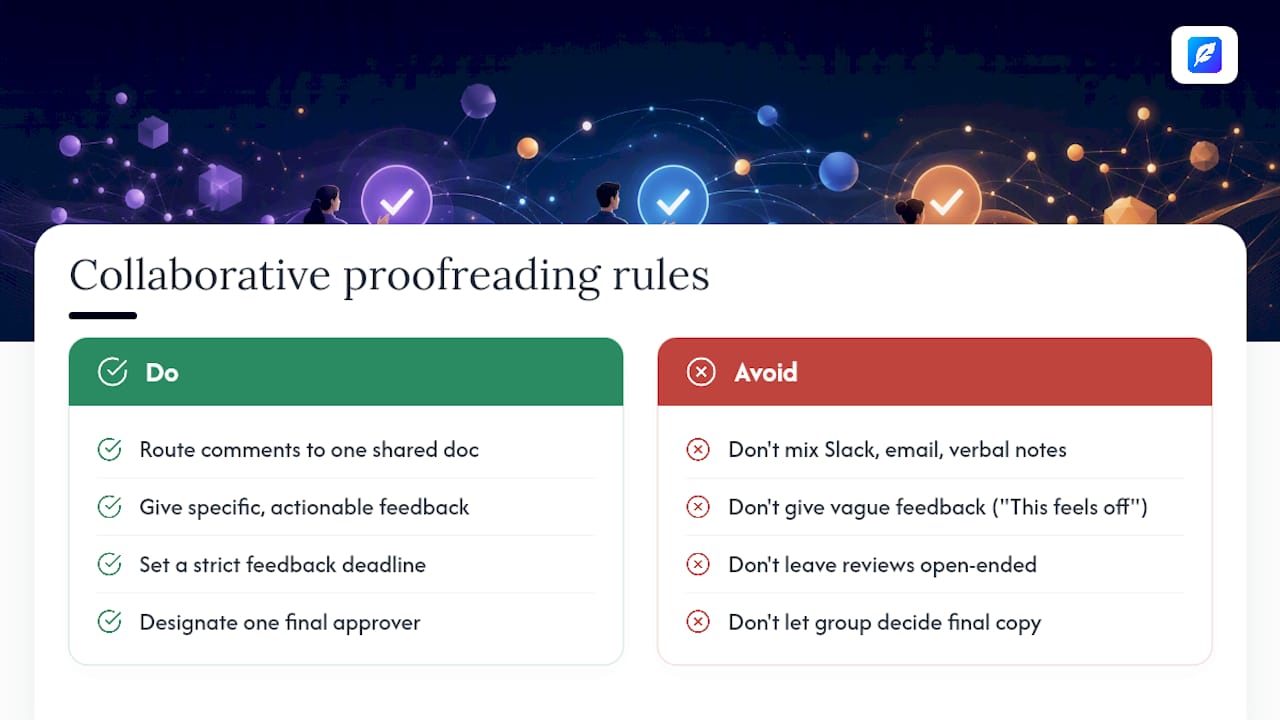
The moment more than one person touches a post, feedback tends to scatter, and scattered feedback is where good edits get lost or contradicted. The fix isn't more meetings. It's a tighter structure for how feedback gets given and where it lives.
Route every comment through one shared document or tool rather than a mix of Slack messages, email threads, and verbal notes. When three people suggest three different fixes in three different places, the person publishing the post has no reliable way to know which one won. A single thread, even a basic shared doc with comments, solves that instantly.
Give feedback in specific terms rather than vague ones. "This feels off" tells the writer nothing useful; "the second sentence contradicts our pricing page" tells them exactly what to fix. Specific feedback also gets resolved faster, because there's no back-and-forth needed to clarify what the reviewer meant.
Set a deadline for feedback, not just for the post itself. Open-ended review windows are how a caption sits half-finished for three days while everyone assumes someone else will finalise it. A short window, even 20 minutes for a routine post, forces decisions instead of drift.
Finally, decide in advance who has final say when reviewers disagree. Democracy is slow and often produces a watered-down compromise caption that reads like it was written by committee, because it was. One approver, informed by the feedback but not bound to accept all of it, keeps the process moving and the voice consistent.
A tiny habit that saves reputation and ad spend
I've watched a three-pass routine catch a wrong pricing figure in a boosted post before it went live, the kind of error that would have cost real money in refunds and awkward replies if it had slipped through. Small habit, outsized payoff. Build the pass into your routine rather than treating it as optional extra work, and even when you lean on AI for speed, keep the final human read-aloud. It's the cheapest insurance you'll ever buy for a brand account.
— Mike
A faster first pass without handing over your drafts
There are other ways to catch these errors, a colleague's second read, a style guide pinned to the wall, a slower manual three-pass routine done entirely by eye. Inspirowrite gives you a faster route to the same result: grammar, clarity, and tone fixes back in seconds, with your drafts kept private rather than used to train a public model.
Use it for the first pass on captions, threads, or longer posts, then finish with the human read-aloud and link check outlined above. That combination gets you speed where speed matters and judgement where judgement matters, without ever skipping the step that actually catches brand-voice or factual slips. For teams juggling multiple languages, the same approach applies to translated captions, worth pairing with a multilingual content workflow if you're posting across markets. Start a draft at Inspirowrite and run your next caption through it before you schedule anything.
Sources
- How to edit photos on Instagram after posting (CapCut resource)
- How to self-edit your captions: the ruthless pass before you hit post (SocialKit)
- How to use social media AI tools to grow your business (Forbes)
- How to edit caption on Instagram like a pro (PostNitro)
FAQ
What are five good proofreading techniques for social posts?
Run spellcheck and review its suggestions, read the post aloud, scan for homophones, verify every link and handle, and check punctuation around numbers and offers.
Is AI replacing human proofreaders for social content?
No. AI tools like Inspirowrite speed up grammar and clarity fixes, but human review still catches brand voice and factual errors that AI tends to miss.
How much should I charge to proofread 1,000 words?
Rates vary widely by experience, market, and turnaround time, so there's no single standard figure; freelance proofreaders typically price by the job, the word, or the hour depending on the client relationship.
What are the most common mistakes to check for when proofreading?
Missing or repeated words, homophones, broken CTA links, incorrect handles, and tone drift away from your usual brand voice are the five that recur most often.
Can I edit an Instagram caption after it's already posted?
Yes. Captions, tags, location, and alt text can be edited after publishing without notifying followers, though the photo or video itself cannot be changed.