

Run a five-minute check on every calendar item before it moves to scheduled: confirm the headline matches the final content, the CTA links to the right destination, the publish date and timezone are correct, all assets are attached, and the copy fits the channel's tone and character limits. Add a one-line "changes made" note inside the calendar card so the next reviewer knows exactly what was updated.
Quick pre-publish checks to run on every calendar item:
- Headline clarity: does the working title match what the piece actually delivers?
- CTA accuracy: is the button text correct, and does the link resolve to the right page?
- Dates and timezones: is the scheduled time set in the correct timezone for your audience?
- Channel fit: does the copy length and tone suit the platform (Twitter/X character limits, LinkedIn register, email subject line length)?
- Assets attached: are images, videos, or graphics uploaded and labelled correctly?
- Changes flagged: add a brief note in the card comments so reviewers can see what was revised.
Table of Contents
- When should you proofread in the content calendar lifecycle?
- Your per-item proofreading checklist for calendar entries
- How do you assign roles and keep approvals moving?
- Which tools speed up calendar copy review without creating privacy risks?
- Why proofreading the brief early saves your team real time
- Common mistakes that slip through calendar workflows
- How do you scale proofreading when volume grows?
- Key takeaways
- What an editor actually checks in a calendar card
- Inspirowrite fits directly into your calendar review workflow
- Useful sources and templates
- FAQ
When should you proofread in the content calendar lifecycle?
Proofreading is not a single pass at the end. The most effective approach runs three distinct checks at different stages, each catching a different class of error.
-
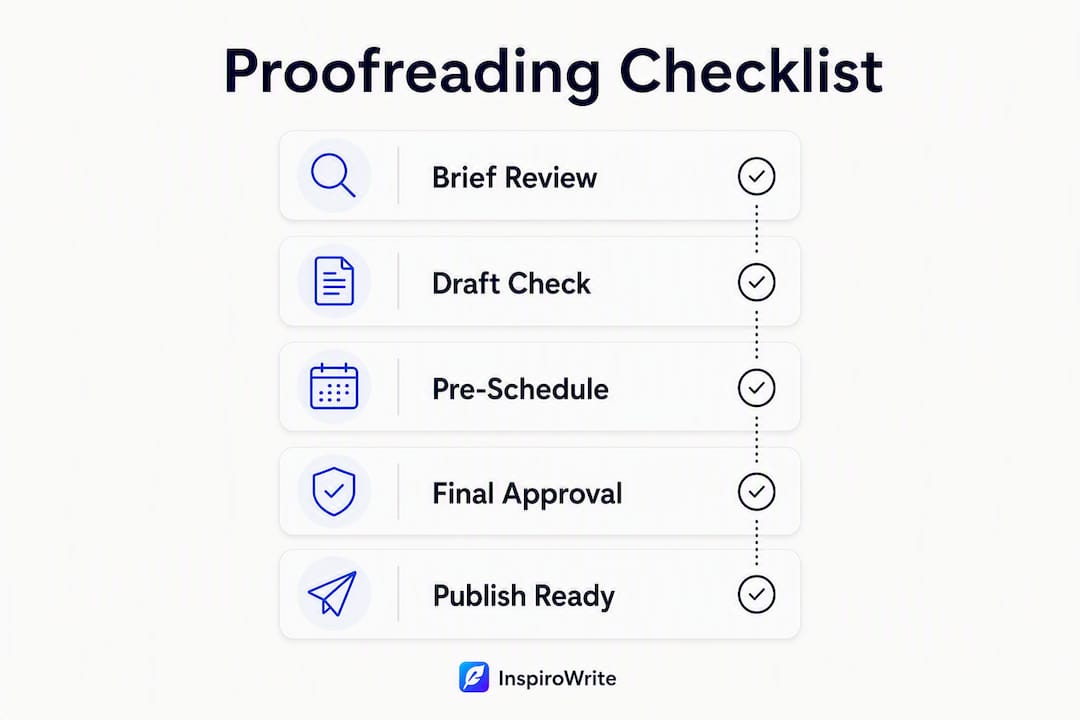
Brief-stage proof (before drafting begins). Read the brief for logical consistency: does the angle match the audience problem, is the evidence requirement clear, and is the tone direction unambiguous? This pass takes roughly five minutes per item but prevents the most expensive errors. A well-structured brief with clear strategic and operational fields helps writers deliver a first draft that needs far fewer rewrites, as research on content brief templates confirms. Catching a misaligned angle here costs nothing; catching it after three drafts costs hours.
-
Pre-schedule check (when copy is added to the calendar). Once the writer has populated the calendar card with final copy, a second reviewer reads for grammar, tone, CTA accuracy, and channel-specific requirements. Budget a short but sufficient time per item. This is also the moment to verify that final-deliverable proofreading is genuinely distinct from the brief-stage pass: you are now checking execution, not strategy.
-
Final pre-publish QA (last-minute verification). Immediately before the item goes live, a scheduler or publisher runs a quick mechanical check: link resolution, asset presence, date and timezone, and metadata. No copy editing at this stage. If something substantive needs changing, the item goes back to step two rather than being patched on the fly.
Front-loading review into the brief stage is where teams recover the most time. Clearer briefs produce fewer misaligned drafts, which means fewer revision rounds and a lower overall cost per published asset.
Your per-item proofreading checklist for calendar entries
Treat this as a copy-paste checklist you attach to every calendar card template. Group items by priority so reviewers know what blocks publication and what is advisory.
Critical (publish-blocking):
- Working title matches the final headline and the content it introduces
- CTA text is accurate and the destination URL resolves correctly
- Scheduled date, time, and timezone are confirmed
- All assets (images, video, graphics) are attached and correctly labelled
- Approval status is set and the correct owner is assigned
Important (conversion and brand):
- Tone and register suit the target audience and channel
- Copy length fits platform constraints (character limits, email subject line, meta description)
- UTM parameters and tracking links are present and correctly structured
- SEO title and meta description are populated where applicable
- Claims carry a source link or are flagged for SME sign-off
Nice to check (style and consistency):
- Hashtags are relevant and correctly formatted
- Alt text is written for all images
- Naming conventions match the house style guide
- CMS or publishing notes are complete
A practical checklist structure like this adapts well from essay proofreading frameworks and can be attached directly to your calendar template or saved to a shared drive so every team member pulls from the same version.
Pro Tip: Create a pinned comment template inside your calendar tool (Notion, Trello, or similar) with the checklist pre-populated. Reviewers tick items off in the comment thread rather than maintaining a separate document.

How do you assign roles and keep approvals moving?
Bottlenecks in calendar review almost always come from unclear ownership, not from the volume of copy. Three roles cover most teams.
- Author/creator: writes the copy, populates the calendar card, and sets status to "Ready for review." Turnaround: as agreed in the brief.
- Editor/proofreader: runs the pre-schedule check, leaves comments anchored to specific copy elements, and moves status to "Approved" or "Revisions needed." Budget a variable amount of time depending on criticality.
- Scheduler/publisher: runs the final pre-publish QA, confirms assets and links, and sets the item live. This role should never be making copy decisions at this stage.
The sign-off flow runs in one direction: brief proof → draft check → pre-schedule sign-off → publish approval. Each status change happens inside the calendar tool itself. Edit from the saved draft in the calendar rather than recreating copy elsewhere, since working outside the canonical record creates version drift that reviewers then have to reconcile.
For sensitive or novel claims, add an escalation rule: the editor flags the item with a "SME review required" tag before approving. The subject-matter expert has a defined turnaround (typically four hours for time-sensitive items) and signs off in the card comments.
Pro Tip: Set a lightweight SLA directly in your calendar tool using status fields and due-date reminders. A required checklist tick before status can advance to "Approved" stops items moving forward with open issues.
Understanding where editing ends and proofreading begins keeps each role focused and prevents reviewers from duplicating effort.

Which tools speed up calendar copy review without creating privacy risks?
The right tool stack for proofreading calendar copy depends on where your team already works, but a few categories cover most needs.
- Calendar and board tools (Notion, Trello, Asana-style boards): use status fields, assignee tags, and comment threads anchored to specific cards as your primary review layer.
- Lightweight document editors embedded in calendar cards (Google Docs, Notion pages): allow inline comments and suggestion mode so reviewers mark changes without overwriting the source copy.
- Grammar and tone checkers: run copy through a dedicated tool before it enters the calendar to catch mechanical errors early.
- AI-assisted suggestion tools: useful for flagging tone inconsistencies and novel claims that need human verification. Automation agents can draft first-pass copy from the editorial calendar and route it for human review, which speeds throughput on high-volume campaigns.
- CMS preview links: attach a staging preview URL to the calendar card so the final reviewer sees the copy in context before approving.
- Automated link-checkers and UTM validators: run these as a scheduled step before the publish window, not manually.
UK privacy considerations matter here. Keep sensitive claims and any customer data out of shared public drafts. Choose tools that meet UK GDPR expectations and, for AI-assisted tools specifically, prefer solutions that do not reuse your content to train their models. That last point is particularly relevant when calendar copy contains unreleased product information or client data.
Pro Tip: Attach the source research document or brief directly to the calendar card. Reviewers can verify claims against the original evidence without leaving the tool, which cuts the back-and-forth that slows sign-off.
Why proofreading the brief early saves your team real time
The most effective proofreading happens before a word of the draft is written. Checking the brief for tone direction, logical consistency, and evidence requirements at the planning stage prevents the downstream rewrites that consume editorial hours.
Proactive editorial review during the planning phase reduces later revision cycles and saves editorial time per asset. The causal pathway is straightforward: a clearer brief produces fewer misaligned drafts, fewer misaligned drafts mean fewer revision rounds, and fewer revision rounds lower the time and budget cost of each published piece.
Practical content brief templates that capture ICP, angle, evidence requirements, and linking guidance help writers deliver stronger first drafts, as current briefing guides demonstrate. The brief is a strategic tool, not a formality.
Pro Tip: Add a mandatory "brief proofed" tick to your calendar template before any draft is commissioned. a brief editor check before the writer starts. That single gate prevents the most expensive class of revision.
Common mistakes that slip through calendar workflows
Even experienced teams miss the same categories of error. Here is what to look for and how to fix each one in the calendar card.
- Wrong publish date or timezone: the item is scheduled for 9 AM but in the wrong timezone. Fix: add the timezone explicitly to the date field and confirm it against the campaign brief.
- Wrong channel tone: a LinkedIn post drafted in a casual Instagram register. Fix: add a one-line tone note to the card template for each channel.
- Missing assets: the card is approved but the image file is absent or a placeholder. Fix: make asset attachment a required field before status can advance.
- Broken or incorrect links/UTM tags: the CTA resolves to a 404 or the UTM source is misspelled. Fix: run an automated link-check as part of the pre-publish QA step.
- Vague CTAs: "Click here" or "Learn more" with no context. Fix: the editor rewrites to a specific action ("Download the free template") during the pre-schedule check.
- Inconsistent naming conventions: campaign names, product names, or hashtags spelled differently across cards. Fix: keep a living style glossary pinned in the calendar tool.
- Claims without source links: a statistic or product claim with no attribution. Fix: flag with "source required" tag; item cannot move to approved until resolved.
- Reused headline that mismatches content: a working title carried forward from a previous campaign. Fix: the brief-stage proof catches this before drafting begins.
Log recurring issues in a shared "error register" and feed them back into your brief template and calendar card defaults. Patterns that appear three or more times become a new checklist item or a template field.
Self-proofreading tactics for catching your own errors in English copy are worth building into the author's own pre-submission step, before the editor ever sees the card.
How do you scale proofreading when volume grows?
High-volume calendars need a tiered approach rather than a uniform review of every item.
- Batch similar items: review all social posts for a single campaign in one sitting. Context switching between formats costs more time than the review itself.
- Tiered review: a senior editor spot-checks high-stakes items (product launches, paid campaign copy, press-adjacent content) while automated tools handle mechanical checks (grammar, links, UTM structure) across the full calendar. Random QA sampling on lower-priority items catches drift without requiring full coverage.
- Automation: link-checkers, UTM validators, and templated copy blocks reduce the mechanical load. AI-assisted tools can flag novel assertions for human approval, so reviewers focus attention where it matters rather than re-reading boilerplate.
- Style glossary: keep a living style sheet accessible directly from the calendar. New writers align faster when the reference is one click away from the card they are editing.
For teams publishing in multiple languages, a cross-language proofreading checklist adds a useful layer of structure to the review process.
Key takeaways
Proofreading calendar copy at the brief stage, not just before publish, is the single highest-leverage change a content team can make to reduce revision cycles and publish cleaner work.
| Point | Details |
|---|---|
| Three-pass review | Run brief-stage, pre-schedule, and final pre-publish checks at separate stages to catch different error types. |
| Brief proofreading saves time | Proactive review at the planning phase reduces later revision cycles and editorial time per asset. |
| Role clarity prevents bottlenecks | Assign author, editor, and scheduler roles with defined turnaround times and status-field sign-offs. |
| Privacy-aware tool choice | Prefer tools that meet UK GDPR standards and do not reuse your content to train AI models. |
| Inspirowrite in the review loop | Inspirowrite's instant grammar and tone checks, history tracking, and privacy-focused processing slot directly into the pre-schedule review step. |
What an editor actually checks in a calendar card
The brief is where I spend the most time, and it is almost never where teams think the risk sits. Most reviewers focus on the finished copy: the headline, the CTA, the grammar. Those matter. But by the time copy reaches the calendar card, a misaligned angle or an unverifiable claim has already cost someone two drafts.
My actual first check on any calendar item is the brief note attached to the card. Does the angle match the audience problem stated in the brief? Is there a source for the central claim, or is the writer expected to find one mid-draft? If either answer is no, the item goes back before a word of copy is written.
For the copy itself, tone is the error I catch most often. A post drafted for LinkedIn that reads like a product changelog, or an email subject line that uses the casual register of an Instagram caption. The fix is usually one sentence in the card's tone field, but it only works if the reviewer catches it at the pre-schedule stage rather than after the scheduler has queued it.
The real role of proofreading is not catching typos. It is catching the gap between what the brief promised and what the copy delivers. Typos are the last thing to fix, not the first.
Inspirowrite fits directly into your calendar review workflow
Calendar copy review moves fast, and the gap between "approved" and "published with an error" is often just one missed check. Inspirowrite gives content teams instant grammar and tone corrections, style adjustments, and rephrasing suggestions without the turnaround time of a managed proofreading service.
Paste your calendar copy into Inspirowrite, run a check in seconds, and surface suggested edits as comments you can approve or dismiss before the copy goes back into the calendar card. History tracking means you can see exactly what changed between versions, which matters when a scheduler needs to confirm the approved copy is what actually published. For teams handling sensitive briefs or unreleased product copy, Inspirowrite's processing does not use your content to train AI models, so confidentiality stays intact. Business customers get team access and API options that connect directly to existing calendar and CMS workflows.
Try Inspirowrite to run your next calendar review in seconds rather than hours.
Useful sources and templates
- The real role of proofreading in writing quality — Inspirowrite guide on proofreading versus editing and checklist patterns.
- How to proofread your own English writing — stepwise self-proofreading tactics adaptable for calendar copy.
- The role of proofreading final deliverables — how final-deliverable checks differ from brief-stage review.
- Why editing differs from proofreading: a clear guide — role boundary reference for workflow design.
- Edit a post from calendar or explorer — how-to page on editing from the canonical calendar draft to avoid version drift.
- Inspirowrite — AI-powered proofreading and tone tool with team access and privacy-focused processing.
FAQ
What is the fastest way to proofread content calendar copy?
Run a five-point check per card: headline match, CTA link, publish date and timezone, assets attached, and approval status set. This takes under five minutes per item and catches the errors most likely to block or embarrass a publication.
When in the calendar workflow should proofreading happen?
At three stages: brief creation (before drafting), pre-schedule (when copy is added to the card), and final pre-publish QA. Brief-stage review is the highest-leverage pass because it prevents misaligned drafts before they are written.
How does Inspirowrite help with calendar copy review?
Inspirowrite runs instant grammar, tone, and style checks on copy pasted from a calendar card, surfaces suggested edits in seconds, and tracks version history. Its processing does not use your content to train AI models, which suits teams handling confidential briefs.
What are the most common errors in content calendar copy?
Wrong timezone on scheduled posts, broken or misspelled UTM links, missing assets, vague CTAs, and tone mismatches between the copy and the target channel. Logging these in a shared error register and feeding them back into brief templates prevents the same mistakes recurring.
Who should sign off on calendar copy before it publishes?
An editor or proofreader approves the pre-schedule check; a scheduler or publisher confirms the final pre-publish QA. For sensitive or novel claims, a subject-matter expert signs off before the editor approves, using a "SME review required" tag in the calendar tool.