

The fastest repeatable way to revise a blog post is a five-step, timeboxed workflow: pull your Google Search Console data to find high-impression, low-CTR posts, run a quick content audit, rewrite in focused passes, apply SEO fixes, then publish and monitor. Done properly, a single revision session runs a moderate amount of time depending on how much the post needs.
Here is the micro-checklist you can copy right now:
- Open Search Console and filter for posts with high impressions but below-average CTR or a falling average position.
- Score the post against a short audit (structure, freshness, links, CTA) before touching a word.
- Rewrite in three passes: structure first, then content, then line-level clarity.
- Run an SEO pass: title, meta description, headings, internal links, alt text.
- Run a final proofread using a private, fast tool such as Inspirowrite, which processes your draft without using it to train AI models.
- Update the publish date, submit to Search Console, and log the baseline metrics.
- Check impressions, clicks, and average position at two weeks and again at eight weeks.
Pro Tip: Paste your draft into Inspirowrite after the SEO pass for an instant grammar and style check. It returns suggestions in seconds and keeps your content confidential, which matters when you are revising client work or commercially sensitive posts.
Key takeaways
Revising blog posts efficiently comes down to one repeatable system: use Search Console data to pick the right posts, audit before you rewrite, work in timed passes, and measure the outcome at two and eight weeks.
| Point | Details |
|---|---|
| Prioritise with data | Use Search Console impressions, CTR, and average position to find high-ROI revision candidates first. |
| Audit before rewriting | Score each post on clarity, structure, freshness, links, and CTA before touching a word. |
| Work in timed passes | Separate structural, content, SEO, and proofread passes to avoid context-switching and over-editing. |
| Measure at two and eight weeks | Log baseline metrics before publishing; ranking movement from substantive rewrites takes 4–12 weeks. |
| Use Inspirowrite for the proofread pass | Inspirowrite returns instant grammar and style suggestions while keeping your draft confidential. |
Table of Contents
- Why updating old posts is worth 60 minutes of your time
- How to choose which posts to revise first
- A fast content audit you can run in one pass
- The efficient, timeboxed revision workflow
- SEO edits that actually move the needle
- How to edit faster without losing quality
- Publish, request indexing, and measure what changes
- A copyable checklist and spreadsheet template
- Keeping your brand voice consistent across every revision
- An editorial perspective on fast revisions
- Inspirowrite makes the proofread pass faster and safer
- Sources
- FAQ
Why updating old posts is worth 60 minutes of your time
Revised content tends to recover traffic that has quietly slipped away. A post that ranked on page one two years ago may now sit at position 14 because a competitor published something fresher, or because the original answer no longer matches what searchers actually want. Fixing that takes far less effort than writing a new post from scratch, and the existing backlinks and domain authority carry over.
The concrete benefits stack up quickly:
- Traffic recovery: posts that have lost ranking ground often regain positions within weeks of a substantive update, because search engines treat a meaningful revision as a freshness signal.
- Better CTR: rewriting a title and meta description to match current search intent can lift click-through rate without any change to ranking position.
- Improved conversions: updating a call to action, adding a relevant internal link, or replacing a broken outbound link directly affects what readers do after they arrive.
- Reduced bounce rate: outdated facts, dead links, and thin sections push readers away fast. Fixing them keeps people on the page longer.
- Fresher content signals: search algorithms factor in content freshness for time-sensitive queries. Updating a post signals that the information is current.
A revision session of a reasonable length is a realistic investment for most posts. Structural rewrites take longer; a metadata and link tidy-up can be done in under half an hour. The LumenSEO seven-step guide frames this as a targeted, analytics-driven process rather than a wholesale rewrite, which is the right mental model: fix what is underperforming, leave what is working.
How to choose which posts to revise first
Not every post deserves your time this week. The highest-ROI candidates share a pattern: they already attract search impressions but fail to convert those impressions into clicks or rankings. That gap is where a revision pays off fastest.
The signals to look for in Google Search Console and your analytics platform:
- High impressions, low CTR: the post appears in search results but searchers are not clicking. A better title and meta description often fixes this in one pass.
- Position 6–20: posts sitting just off page one are the closest to a meaningful traffic jump. A content and SEO update can push them over the line.
- Falling average position over 90 days: a post that has dropped steadily is losing ground to fresher or more thorough competitors.
- Decent backlinks, weak traffic: existing authority is being wasted. A content refresh can activate it.
- Evergreen topics with outdated facts: how-to posts, guides, and listicles age quickly. If the core topic is still searched, the post is worth updating.
- Low conversions despite traffic: the post brings readers in but they leave without acting. A CTA or internal-link update is often all it needs.
Use a simple spreadsheet to score and rank candidates. Here are the columns that matter:
| Column | What to record |
|---|---|
| URL | Full post URL |
| Impressions (90 days) | From Search Console Performance report |
| Clicks (90 days) | From Search Console Performance report |
| CTR | Clicks ÷ impressions |
| Average position | From Search Console |
| Backlinks | From your link-analysis tool |
| Last updated | Date of most recent revision |
| Priority score | Your 1–5 rating based on the signals above |
Pro Tip: *Timebox the prioritisation task to 30 minutes for up to 50 URLs.
The LumenSEO guide reinforces this analytics-first approach: choose posts by data, not by gut feeling or how recently you wrote them.
A fast content audit you can run in one pass
Before rewriting anything, spend five minutes scoring the post. A quick scorecard stops you from over-editing strong sections and under-editing weak ones.
Score each dimension on a 0–2 scale:
| Dimension | 0 (needs full rewrite) | 1 (needs moderate edit) | 2 (minor tweak only) |
|---|---|---|---|
| Clarity | Confusing or vague throughout | Some unclear sections | Clear and direct |
| Structure | No logical flow, poor headings | Mostly logical, a few gaps | Well-structured |
| Freshness | Facts or stats are outdated | Some outdated elements | Current and accurate |
| Length | Too thin or bloated | Slightly off | Appropriate depth |
| Images | Missing or irrelevant | Needs updating | Relevant and optimised |
| Internal links | None or broken | A few, not strategic | Good coverage |
| CTA | Absent or misaligned | Weak or generic | Clear and relevant |
Add up the scores. A total of 11–14 means minor tweaks only. A score of 7–10 means a moderate rewrite. Below 7, plan a full structural overhaul.
The Belike makes the same point: tracking a consistent set of variables across posts helps you spot patterns in your own drafting habits, which speeds up future revisions because you stop making the same structural mistakes.
Quick audit checklist to run alongside the scorecard:
- Are all statistics and facts still accurate and dated correctly?
- Do all outbound links resolve without a 404?
- Are images compressed, labelled, and carrying descriptive alt text?
- Is there a schema markup type applied (Article, HowTo, FAQ)?
- Does the post have a clear, single call to action?
- Are there at least two relevant internal links pointing to other posts or pages?
The efficient, timeboxed revision workflow
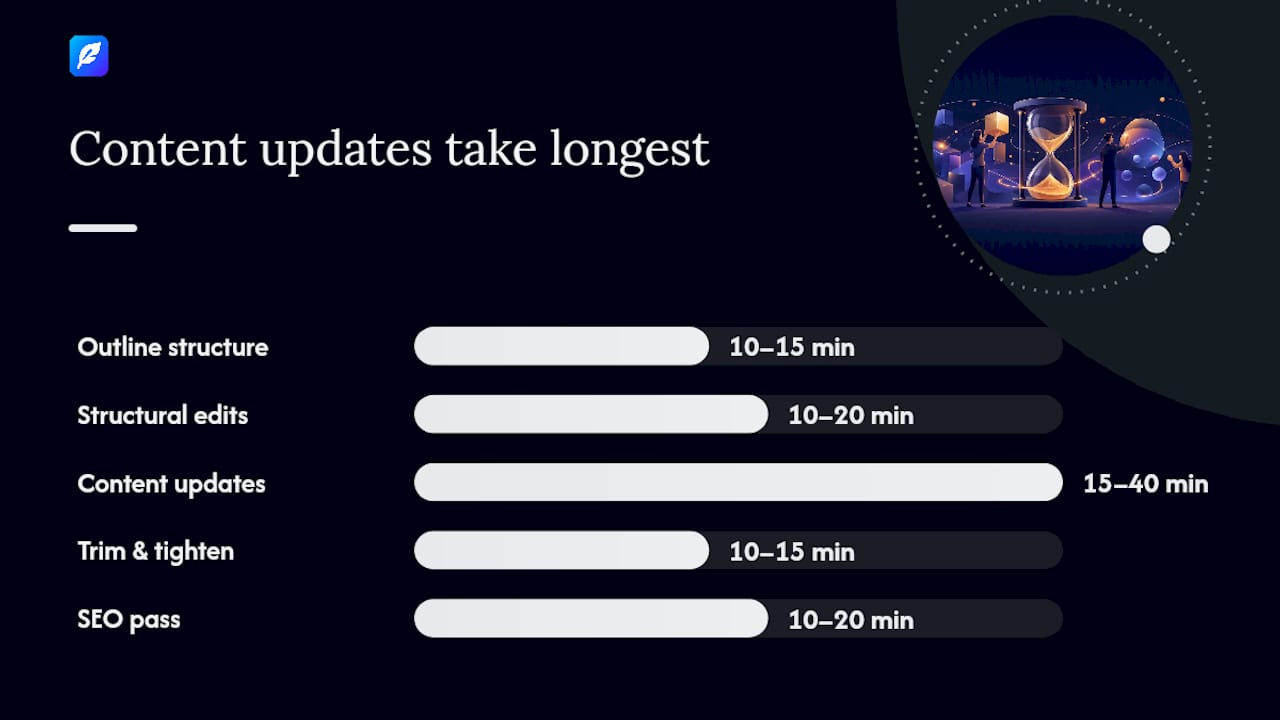
This is the core process. Run it in order and keep a timer running for each step. The total time depends on your audit score: a minor-tweak post takes 30–45 minutes; a full rewrite takes up to two hours.
-
Outline the revised structure (10–15 minutes). Read the post once without editing. Decide which sections stay, which get cut, and where new content belongs. Jot a revised outline in a separate document or at the top of your draft.
-
Structural edits (10–20 minutes). Reorder or merge sections based on your outline. Fix heading hierarchy (one H1, logical H2/H3 nesting). Add or remove subheadings to match the revised flow. Do not rewrite sentences yet.
-
Content updates (15–40 minutes). Update outdated facts, replace weak examples with current ones, and fill any gaps the audit flagged. Use placeholders like (fact-check) or (add example) when you need to verify something rather than stopping mid-pass to research.
-
Trim and tighten (10–15 minutes). Cut every sentence that does not add information. Shorten paragraphs that run past five or six sentences. Remove filler phrases.
-
SEO pass (10–20 minutes). Rewrite the title and meta description, check keyword placement in the first paragraph and at least two subheadings, fix or add internal links, and update alt text on images.
-
Internal links and images (5–10 minutes). Add at least one new internal link to a relevant post. Replace any image that is outdated or missing alt text.
-
Proofread (5–10 minutes). Read aloud or use a fast private proofreading tool. This is the pass where grammar, punctuation, and style inconsistencies get caught.
-
Publish prep (5 minutes). Update the publish date, check the canonical tag, confirm the meta description is under 160 characters, and save a clean final version.
Before: "In this article we will look at some of the ways that social media can be used by businesses." After: "Social media gives businesses a direct line to customers, but only if the content matches what those customers actually search for."
Pro Tip: Timebox each step before you start. When the timer goes off, move on even if the step feels unfinished. You can return in a second pass. Stopping mid-step to perfect one paragraph is how a 45-minute revision turns into a three-hour one.
The ProBlogger seven-step editing workflow follows a similar sequence: plan, rest, big-picture edit, cut, line edit, SEO edit, publish. The key shared principle is that structural decisions come before line-level ones.
Revision checklist (copy this into your task manager):
- Revised outline complete
- Structural edits done
- Facts and examples updated
- Trimmed and tightened
- SEO pass complete
- Internal links and images updated
- Proofread complete
- Publish prep done
SEO edits that actually move the needle
Content quality gets readers to stay. SEO edits get them there in the first place. After the content rewrite, work through this checklist in order.
- Title tag: include the target keyword near the start, keep it under 60 characters, and make it match the searcher's intent. Avoid clickbait phrasing that does not reflect the content.
- Meta description: write 140–155 characters that summarise the post's value and include the target keyword naturally. This does not affect ranking directly, but it affects CTR.
- Heading hierarchy: one H1 (the post title), H2s for main sections, H3s for subsections. The target keyword or a close variant should appear in at least one H2.
- Keyword placement: the target keyword should appear in the first 100 words, in at least one subheading, and in the conclusion or final section.
- URL/permalink: if the current URL is already indexed and has backlinks, keep it. Only change a URL when it is genuinely misleading or contains a year that is now wrong. When you do change it, set up a 301 redirect immediately using a tool such as Redirection to avoid losing link equity.
- Alt text: every image needs a short, descriptive alt attribute. Include the target keyword in one image's alt text where it fits naturally.
- Internal links: add at least two contextual internal links per post. Link to posts that are topically related, not just any page on your site.
- Broken links: check all outbound links. A single broken link to an authoritative source undermines credibility and wastes crawl budget.
- Schema markup: add or update Article, HowTo, or FAQ schema where relevant. This does not guarantee rich results, but it makes them possible.
Before title: "Social Media Tips for Small Businesses 2019" After title: "Social media for small businesses: what works in 2026"
Pro Tip: Never change a URL just because the post has been updated. A 301 redirect preserves most link equity, but "most" is not "all." The safest move is to keep the original URL and update the content around it.
Keyword research does not have to be a separate project. Pull the queries already driving impressions to your post from the Search Console Performance report, then weave the strongest related phrases into your updated title, subheadings, and first paragraph. WordStream's keyword tools can help you find related terms quickly if you want to expand beyond what Search Console shows.
The Eesel recommends treating the SEO pass as its own distinct stage, separate from the content and clarity passes, so that neither task dilutes the other.
How to edit faster without losing quality
Speed and quality are not opposites. The trick is batching: grouping the same type of edit across multiple posts in a single session, so your brain stays in one mode rather than switching between structural thinking, line editing, and SEO analysis every few minutes.
The three-pass model works well here:
- Structure pass: read for flow, logic, and completeness. Move or cut sections. Do not touch individual sentences.
- Clarity pass: read for sentence-level readability. Shorten long sentences, replace vague nouns with specific ones, cut filler phrases.
- Polish and proofread pass: grammar, punctuation, spelling, and style consistency. This is where a fast private proofreading tool earns its keep.
ProductiveBlogging recommends separating edits into content, readability, and SPAG (spelling, punctuation, and grammar) passes, and letting drafts sit before editing to gain objectivity. Even a 20-minute gap between writing and editing catches errors that fresh eyes miss.
A practical tool workflow for a single post:
- Work in your local draft or CMS editor for the structure and clarity passes.
- Run the SEO pass using Search Console data and a keyword tool.
- Paste the final draft into Inspirowrite for the proofread pass. It returns grammar and style suggestions instantly, and because it does not use your content to train AI models, sensitive or commercially confidential drafts stay private. Understanding why editing differs from proofreading helps you keep these passes genuinely separate rather than blurring them together.
- Apply the suggested edits, preview the post, and move to publish prep.
Pro Tip: Batch your CTA updates. If you have updated your offer, pricing, or lead magnet, open every post that references it in one session and update the CTA in each. Doing it post-by-post across different sessions wastes context-switching time.
The two-pass drafting principle applies here too: write fast first, edit for clarity second. Trying to perfect sentences during the content update pass is the single biggest time drain in a revision workflow.
Publish, request indexing, and measure what changes
Publishing is not the last step. It is the start of the measurement phase.
Publish checklist:
- Update the "last updated" date in your CMS (visible to readers and to search engines).
- Confirm the canonical tag points to the correct URL.
- Check the meta description is under 160 characters.
- Verify the sitemap includes the updated post and will be re-submitted or auto-updated.
- Confirm all internal links in the post resolve correctly.
- If you changed the URL, confirm the 301 redirect is live.
Requesting indexing in Search Console:
Open the URL Inspection tool in Google Search Console, paste the post URL, and click "Request Indexing." This does not guarantee immediate recrawling, but it signals to Google that the page has changed and is worth revisiting. For a significant content update, this step is worth doing.
What to expect and when:
Crawling signals typically appear within 24–72 hours of a request. Ranking movement takes longer: minor updates may show a shift within two weeks, but substantive rewrites often take 4–12 weeks to reflect in average position. Do not judge a revision by its first week.
Metrics to track in Search Console (Performance report):
- Impressions: are more searchers seeing the post?
- Clicks: are more of those searchers clicking through?
- CTR: has the ratio improved?
- Average position: is the post moving up?
Set a reminder to check at two weeks and again at eight weeks. Log the baseline metrics before you publish so you have a clean before/after comparison. A content calendar proofreading checklist can help you keep track of which posts have been revised and when they are due for a follow-up check.
A copyable checklist and spreadsheet template
Copy this checklist into Notion, Trello, a Google Doc, or any task manager you already use.
Blog post revision checklist:
- Pull Search Console data; identify high-impression, low-CTR or falling-position posts
- Score the post using the audit scorecard (clarity, structure, freshness, length, images, links, CTA)
- Revise outline and structure
- Update facts, examples, and outdated statistics
- Trim and tighten: cut filler, shorten long paragraphs
- SEO pass: title, meta, headings, keyword placement, alt text
- Fix broken links; add at least two internal links
- Proofread with a private tool (Inspirowrite)
- Update publish date and canonical tag
- Submit URL to Search Console for indexing
- Log baseline metrics; set a review reminder at two and eight weeks
Spreadsheet columns for ongoing archive management:
| Column | Usage note |
|---|---|
| Post URL | Full permalink |
| Impressions (90 days) | From Search Console |
| Clicks (90 days) | From Search Console |
| CTR | Calculated: clicks ÷ impressions |
| Average position | From Search Console |
| Audit score | Total from the 0–2 scorecard |
| Last revised | Date of most recent update |
| Next review due | Set 3–6 months after last revision |
Pro Tip: Run this spreadsheet on a quarterly cycle for your top 20 posts and a bi-annual cycle for everything else. Posts that consistently score well can move to an annual check; posts that keep slipping need a deeper structural review, not just a metadata refresh.
The ProBlogger archive maintenance guide makes the case for treating old posts as assets rather than finished work. A consistent review cycle is what separates blogs that compound traffic over time from those that plateau.
Keeping your brand voice consistent across every revision
Revisions introduce a specific risk that new posts do not: voice drift. When you update a post written two years ago, the new paragraphs often sound different from the original ones, especially if your writing style has evolved or if multiple people contribute to the blog.

A few strategies that keep this under control:
Create a short style reference before you start. Pull two or three sentences from your best-performing posts and keep them open in a separate tab while you revise. Use them as a tone benchmark. If a new sentence sounds noticeably different, rewrite it.
Decide on terminology before the content pass. If your brand uses "clients" rather than "customers," or "programme" rather than "program," note it at the top of your draft. Terminology inconsistencies are easy to miss in a timed revision pass and they erode brand credibility quietly.
Flag tense and person shifts. A post that starts in second person ("you should") and drifts into third person ("bloggers often find") reads as patched together. A single read-aloud pass catches most of these.
Use a style guide, even a short one. It does not need to be a 40-page document. A one-page reference covering tone (direct, conversational, no jargon), preferred terms, and formatting conventions is enough to keep a solo blogger consistent and a small team aligned. The multilingual content workflow guide covers how to extend this consistency across language versions, which matters if you publish in more than one language.
Treat the proofread pass as a voice check, not just a grammar check. Read for whether the post sounds like you, not just whether it is grammatically correct. A sentence can be grammatically perfect and still feel off-brand.
An editorial perspective on fast revisions
The conventional wisdom on blog revision is that more time equals better output. Spend a whole day on a post, read it ten times, and it will be perfect. In practice, that approach produces diminishing returns after the first 90 minutes and often results in over-edited prose that has lost its original energy.
The more productive frame is constraint-led editing. When you give yourself 60 minutes and a clear checklist, you make faster decisions, cut more ruthlessly, and focus on the changes that actually move metrics rather than the ones that feel satisfying. The posts that perform best after a revision are rarely the ones that received the most time. They are the ones where the editor correctly diagnosed the problem (weak title, outdated stat, missing internal link) and fixed it without disturbing what was already working.
There is also a privacy dimension that does not get discussed enough. When you paste a draft into a public or free AI tool for proofreading, you are often contributing that content to a training dataset. For business bloggers, agency writers, or anyone working on commercially sensitive content, that is a real risk. A privacy-first proofreading step, where the tool processes your text without retaining or training on it, is not a luxury. It is basic content hygiene. The role of proofreading in writing quality is often underestimated precisely because it is the last step. But a polished, error-free post signals professionalism in a way that no amount of SEO optimisation can replicate.
Inspirowrite makes the proofread pass faster and safer
Revising blog posts efficiently means every step in the workflow needs to earn its time. The proofread pass is the one most bloggers either skip or spend too long on.
Inspirowrite handles that pass in seconds. Paste or upload your revised draft, choose your preferred style (formal, conversational, or SEO-focused), and receive grammar, punctuation, and style suggestions immediately. Your content is processed privately and never used to train AI models, so client work, commercially sensitive posts, and pre-publication drafts stay confidential.
For content teams, the API and business plan options mean the proofread step can be built directly into your publishing workflow rather than bolted on as an afterthought.
Try Inspirowrite on your next revision at Inspirowrite. A free plan is available to get started, with paid plans for higher volume and team access.
Sources
- How to Edit Your Blog Posts in 7 Simple Steps
- How to Update Blog Posts for SEO: A 7 Step Guide
- Search
FAQ
How do I improve a blog post that is already published?
Start with Search Console to identify where the post is underperforming (low CTR, falling position, or low clicks despite impressions), then run a quick audit covering structure, freshness, links, and CTA before rewriting anything.
How long does it take to see results after updating a post?
Crawling signals typically appear within 24–72 hours of requesting indexing in Search Console. Ranking movement from a substantive rewrite usually takes 4–12 weeks to show in average position data.
Are blogs still worth updating in 2026?
Yes. Existing posts carry backlinks and domain authority that new posts lack. A targeted revision of a post with existing impressions and backlinks is almost always a faster route to traffic growth than publishing from scratch.
What is the most efficient way to revise blog posts?
Work in separate, timed passes: structure first, content second, SEO third, proofread last. Batching similar edits across multiple posts in one session cuts context-switching time significantly.
How do I keep my brand voice consistent when revising old posts?
Keep two or three sentences from your best-performing posts open as a tone reference while you revise. Decide on preferred terminology before the content pass, and use the proofread pass as a voice check, not just a grammar check.