
AI translation is accurate enough for internal drafts, casual communication and most European-language pairs, often matching a junior human translator's output. It is not yet reliable enough for legal, medical or brand-critical content, where meaning, tone or terminology mistakes carry real consequences. Use machine translation freely for speed and volume; keep a human in the loop wherever the stakes are high.
TL;DR:
- AI translation performs well on general and European-language content but remains unreliable for legal, medical, or brand-critical material where accuracy is essential.
- Improving quality requires consistent terminology, translation memory, and careful prompting, especially on specialized or complex texts.
- No single AI tool excels across all languages or content types; benchmarks are useful but do not guarantee safety for high-stakes documents.
- A hybrid workflow, combining AI drafts, glossaries, and human review, effectively balances speed, accuracy, and confidentiality for most projects.
- Document translation tools that support file upload and maintain formatting are preferable for professional and localized content to preserve layout and cultural context.
Table of Contents
- How accurate AI translation actually works and gets measured
- Why translation quality shifts by language and content type
- When to trust the machine and when to call in a human
- What to check before choosing an AI translation tool
- A privacy-first workflow that keeps writers in control
- The bottom line on relying on AI translation
- Can AI handle full documents and files, not just text boxes?
- Why the accuracy debate misses the real question
- Try Inspirowrite for translation you can trust with confidential work
- Sources
- FAQ
How accurate AI translation actually works and gets measured
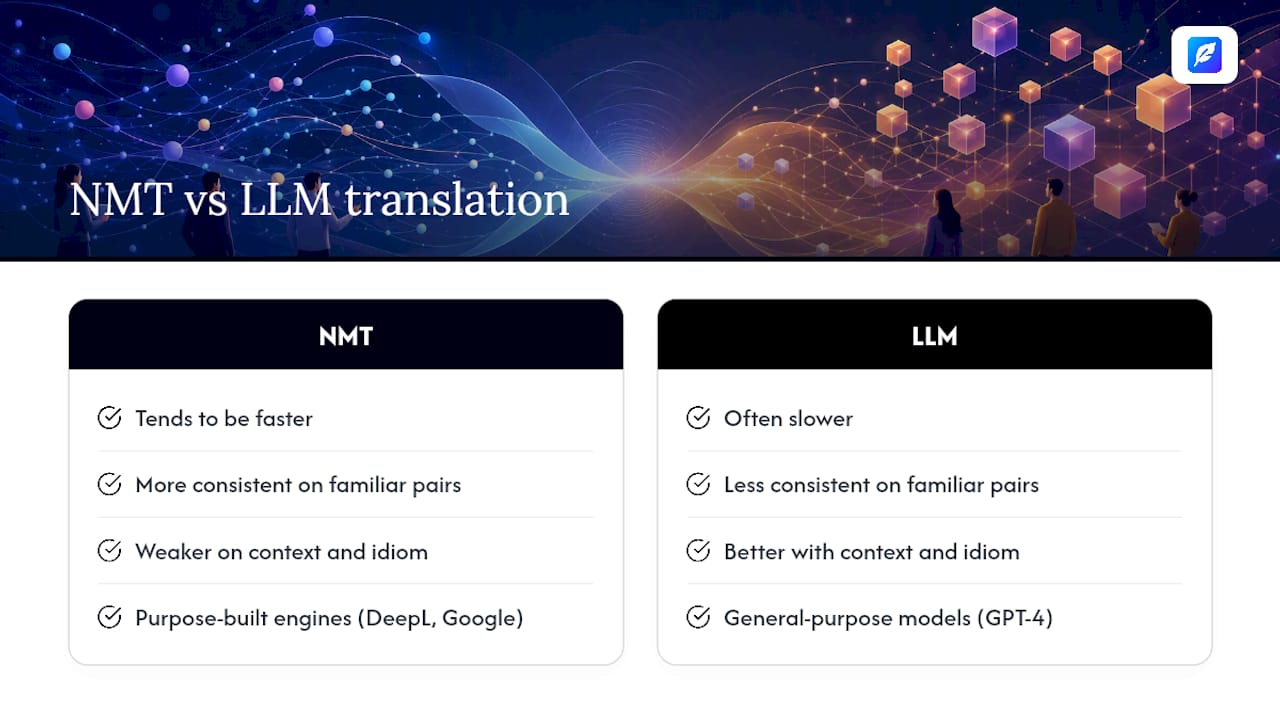
Two technologies sit behind most tools you'll encounter: neural machine translation (NMT), the older, purpose-built approach used by engines like DeepL and Google Translate, and large language model (LLM) translation, where general-purpose models like GPT-4 handle the job through prompting rather than dedicated training. NMT tends to be faster and more consistent on familiar language pairs. LLMs often handle context and idiom better because they were trained on far broader text.
Accuracy gets scored with automated metrics such as BLEU and COMET, which compare machine output against human reference translations. These scores are useful for spotting broad trends but miss fluency, tone and cultural fit entirely. A leaderboard tracking multiple metrics alongside human ratings finds the gap between top systems is often small on average, yet swings widely once you break results down by language pair and subject matter.
What actually moves the needle for real-world accuracy is less glamorous: glossaries, translation memory and well-written prompts, as explored in the AI Profile | Chrome Cactus Studio. Feed a model consistent terminology and prior translations, and output quality improves noticeably. Skip that step, and even a strong model will drift on brand names, technical terms and repeated phrases.
Why translation quality shifts by language and content type
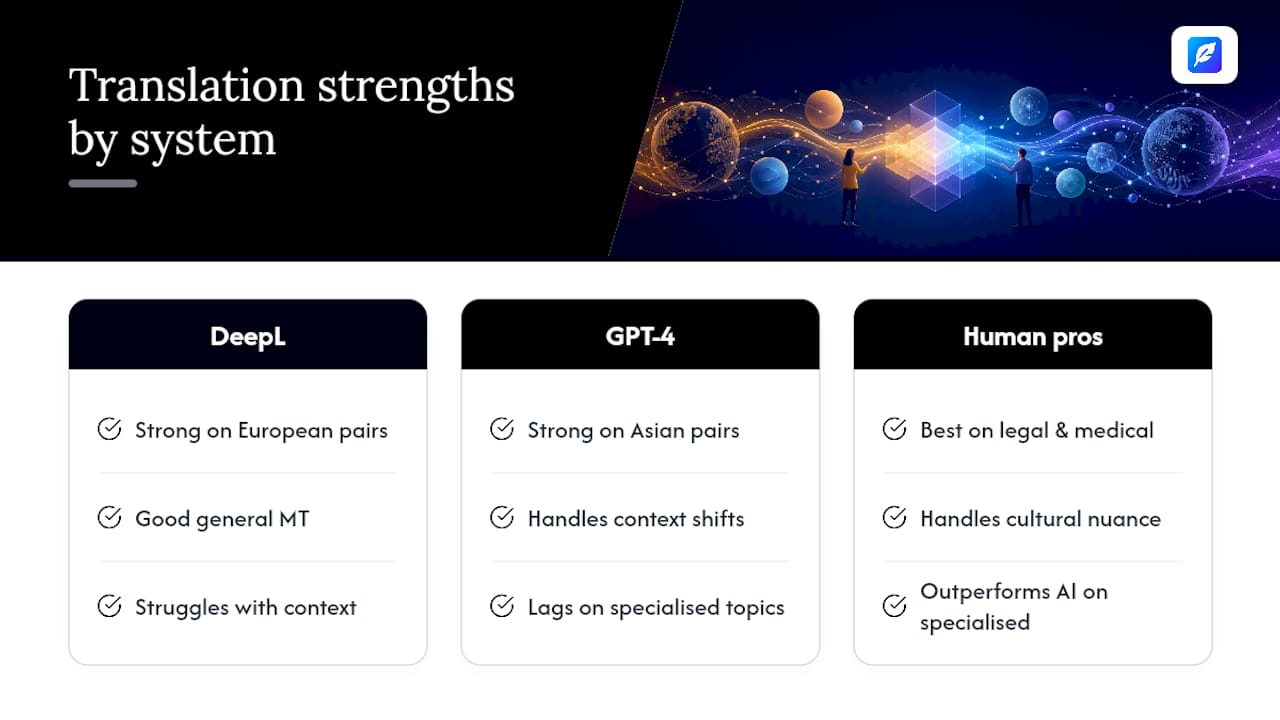
Benchmarks make one thing clear: no engine wins everywhere. Testing across language pairs shows DeepL performing strongly on many European-language combinations, while LLMs like GPT-4 often pull ahead on Asian language pairs and on text where surrounding context changes meaning. Language distance matters. English to Spanish is a much easier problem than English to Japanese, simply because sentence structure and idiom diverge more.
Content type matters just as much as language pair. Marketing copy full of wordplay, humour or cultural references routinely trips up machine translation, because literal renderings lose the emotional register that made the original work. Legal documents are worse: a comparative study of legal translation accuracy found AI systems frequently produce literal translations that miss the legal and cultural framework a term sits inside, while human translators consistently outperformed AI on this content. Medical texts carry similar risk, where a mistranslated dosage instruction or symptom description isn't a stylistic slip, it's a safety issue.
Statistic callout: Research comparing GPT-4 against professional translators found the model performs comparably to junior human translators on many general tasks, but falls behind medium and senior professionals once the subject matter gets specialised or technically dense.
That single finding explains most of the confusion around AI translation accuracy. It's genuinely good, just not evenly good, and the gap tends to open exactly where the consequences of an error are worst.
When to trust the machine and when to call in a human
Treat risk, not convenience, as the deciding factor. Internal drafts, first-pass emails and low-stakes content can go straight from an AI translation tool to publication with minimal review. Anything customer-facing, contractual, medical or brand-defining needs a human checkpoint before it goes anywhere near a reader, a court, or a patient.
A practical verification checklist for anyone reviewing AI-translated text should cover:
- Terminology consistency – check that brand names, product terms and technical vocabulary match across the whole document.
- Legal and regulatory language – flag any clause, warranty or disclaimer for specialist review rather than a general editorial pass.
- Numbers and units – dates, currencies, measurements and dosages are exactly where literal-minded models slip.
- Tone and register – confirm formal documents stay formal and marketing copy still sounds like a person wrote it.
A simple hybrid workflow keeps this manageable:
- Generate the first draft with an AI translation tool, feeding it a glossary if one exists.
- Run a quick automated check for missed terms or obvious mismatches.
- Send anything flagged as high-risk to a human reviewer or subject-matter specialist.
- Sign off low-risk content after a light read-through; escalate anything ambiguous.
Pro Tip: Build your glossary once, in a shared document, and reuse it on every project. Teams that enforce glossaries alongside machine drafts routinely cut review time by roughly half to two-thirds compared with translating from scratch each time.
What to check before choosing an AI translation tool
Not every tool deserves equal trust, and the differences show up in daily use rather than marketing pages. Before committing to one, check for:
- Published language-pair benchmarks, ideally against a named test set rather than a vague accuracy claim.
- Translation memory and glossary support, so terminology stays consistent across long or recurring projects.
- A clear route to human post-edit, either built in or easy to bolt on for sensitive documents.
- File and API support, so you're not copy-pasting text out of contracts or slide decks.
- A privacy policy that states plainly whether your text is used to train future models.
When a vendor claims high accuracy, ask what they're actually measuring. A single BLEU score with no test-set description tells you almost nothing, since methodology and domain coverage matter as much as the headline number. Ask for the language pairs tested, the content type, and whether editorial or human scoring was involved alongside the automated metric.
There's also a cost trade-off worth naming honestly: cheaper, faster tools without glossary support tend to accumulate what practitioners call consistency debt, small terminology drifts that compound across a large document set until a full re-edit becomes unavoidable.
A privacy-first workflow that keeps writers in control
Most accuracy problems in practice aren't about the model, they're about the workflow around it. A sound process looks like this: draft with AI translation, enforce a glossary for recurring terms, then route anything sensitive through a human pass before publishing.
Inspirowrite builds that workflow into a single tool rather than a chain of separate apps. Because it processes text without using it to train future models, writers handling client contracts, academic work or internal business documents get confidential handling as standard, not an add-on. That matters for students submitting coursework and for business teams translating anything that shouldn't sit inside someone else's training data.
Key features that support this in day-to-day use:
- Instant multilingual feedback alongside grammar and style correction, so translation and proofreading happen in one pass.
- File upload and export, avoiding the copy-paste errors that creep in with browser-based tools.
- History tracking, useful for teams checking how terminology was handled in earlier projects.
- Team access with API support for businesses running translation at volume.
| What matters | Why it affects accuracy |
|---|---|
| No training on user data | Keeps confidential documents out of future model outputs |
| Instant feedback | Lets writers catch tone and grammar issues before human review |
| File upload/export | Reduces formatting and copy-paste errors in longer documents |
| History tracking | Supports consistent terminology across repeat projects |
The bottom line on relying on AI translation
Use AI translation freely for speed. Draft, glossary-check, and publish low-risk content without hesitation. For anything legal, medical or brand-defining, build a human checkpoint into the process rather than treating it as optional. Three things to do this week: set up a glossary for your recurring terms, decide which content categories in your workflow require mandatory human review, and test your current tool against a short passage in your hardest language pair to see where it actually struggles. If you want a workflow that keeps translation, proofreading and confidentiality in one place, InspiroWrite is worth trialling on your next document.
Can AI handle full documents and files, not just text boxes?
Document translation is where a lot of tools still fall short, and it's worth checking before you commit hours to a workflow. Pasting text into a translation box works fine for a paragraph, but a 40-page contract, a slide deck, or a formatted report is a different problem entirely, because layout, footnotes, headers and embedded tables all need to survive the process intact.
The better AI translation tools now support direct file upload, handling formats like Word documents, PDFs and presentation slides without forcing you to strip out the formatting first. This matters most for business users translating proposals, reports or slide decks where a broken layout undermines the professionalism of the whole document just as much as a mistranslated sentence would. Slide decks bring their own quirks: text boxes are short, context is often missing, and tone needs to stay punchy rather than literal, which is why dedicated guidance on presentation translation tends to produce better results than a generic text-box approach.
File-based translation also plays into the localisation question. A document translated word-for-word can read as accurate and still feel wrong to a local reader, because localisation and translation solve different problems: one converts language, the other adapts context, currency, date formats and cultural reference points. For anything customer-facing, ask whether your tool is translating the file or genuinely localising it, because the answer changes what a native reader experiences on the other end.
Why the accuracy debate misses the real question
Most coverage of AI translation accuracy asks the wrong question. It treats accuracy as a single number a model either has or doesn't, when the research actually says something more useful: accuracy is conditional, and the condition that matters most is what's at stake if the translation is wrong.
The conventional advice, "check which tool scores highest on benchmarks", isn't wrong so much as incomplete. A tool that tops a leaderboard on European-language marketing copy tells you nothing about how it'll handle a Japanese contract clause. The benchmark gap between top systems is often small on paper, but that average hides the exact cases where errors bite hardest, legal nuance, medical terminology, idiom-heavy marketing.
What I'd prioritise first, before picking any tool, is mapping your own content against risk. Know which documents are disposable drafts and which ones can't afford a mistranslated clause. That single exercise does more for your outcomes than chasing another half-point of BLEU score. The tools have got good enough that the remaining risk sits with the workflow around them, not the model itself.
— Mike
Try Inspirowrite for translation you can trust with confidential work
Inspirowrite is the practical middle ground between a bare-bones translation box and hiring a professional agency for every document. You get instant AI translation and proofreading in one pass, file upload for contracts and slide decks, and a confidentiality policy that keeps your text out of any model training data, which matters if you're handling client work, coursework or internal business documents you can't risk exposing.
It suits students who need a fast, private check on academic writing, freelance writers translating client work under deadline, and business teams who need consistent terminology across repeat projects without waiting on an agency turnaround. History tracking keeps past translations accessible, and API access lets teams plug it into an existing workflow rather than replacing it entirely.
If the guidance above convinced you that a hybrid, privacy-first workflow beats either pure machine output or a slow manual process, the next step is straightforward: try Inspirowrite on your next document and see how the draft holds up against your own glossary and review checklist.
Sources
- How good are GPT models at machine translation? (arXiv)
- A comparative study of accuracy in human vs AI translation of legal documents (JLL)
- The best AI translation tools (Lokalise)
- Translation accuracy leaderboard (NLLB)
FAQ
Which AI translation service is the most accurate?
No single tool wins across every language and content type. DeepL tends to lead on many European-language pairs, while GPT-4 and similar LLMs often perform better on Asian language pairs and context-heavy text, according to benchmark testing. Tools like Inspirowrite that combine AI drafting with glossary support and human post-edit options tend to produce more consistent results in practice than any single engine used alone.
Can ChatGPT translate accurately?
ChatGPT and similar LLMs translate well for general text and often match a junior professional translator's output, but they lag experienced specialists on legal, medical or highly technical content. Treat ChatGPT output as a strong first draft rather than a final version for anything sensitive.
Is there an AI that can translate in real time?
Yes, several tools offer near-instant translation for text, and some support live conversation or captioning with only a short delay. Real-time accuracy is generally lower than document translation because there's no time for the glossary checks or context review that improve quality elsewhere.
Is AI translation accurate?
AI translation is accurate enough for most everyday and business communication, particularly in European-language pairs, but accuracy drops for legal, medical and idiom-heavy content. A comparative study of legal translation found human translators still outperform AI where cultural and legal framing carries real weight, which is why a human review step remains necessary for high-stakes documents.