

TL;DR:
- Translating a report involves converting it into a second language while maintaining meaning, structure, and formatting.
- Using appropriate tools aligned with report size and file format is essential for accurate and efficient translation.
Translating a report into a second language is defined as the process of rendering a source document into a target language while preserving its meaning, structure, and formatting. Professionals and students face this task regularly, whether submitting academic work to an international institution or sharing business findings with overseas partners. The industry term for this process is document translation, and it covers everything from single-page summaries to multi-chapter annual reports. Getting it right requires more than swapping words. It demands the right tools, a clear method, and an understanding of where machine translation falls short.
What tools do you need to convert a report into a second language?
The right tool depends on your file format, report length, and target language. Most translation platforms in 2026 support between 40 and 100+ languages, with free tiers for basic use and enterprise-grade batch processing for larger projects. That range covers the vast majority of professional and academic needs, from Spanish and Mandarin to less common languages such as Catalan or Swahili.

File format is the first practical decision. Translation preserves layout best when you work with native DOCX or PPTX files rather than PDFs. A PDF locks text into a fixed layout, which forces the translation engine to guess at structure. Converting your PDF to DOCX before uploading produces significantly cleaner results.
For standard reports, free online tools handle the job well. GroupDocs Translation supports 46 languages and retains fonts, styles, tables, headers, and images during translation. That makes it a practical choice for reports under 50 pages where speed matters more than enterprise-level control.
For large projects, the distinction between synchronous and asynchronous processing becomes critical. Asynchronous batch processing suits annual reports exceeding 100 pages and requires cloud storage such as Azure Blob. Synchronous processing handles single files instantly but cannot scale to high volumes. Choosing the wrong method causes integration failures and unexpected costs.
Pro Tip: Always check the batch limit before uploading. Platforms can process up to 100 files or 1 GB per single API request. Splitting a large report into chapters before upload prevents processing errors.
For technical reports containing structured data, such as Power BI dashboards, generic translation tools are not sufficient. Embedded metadata like column headers and tooltips require dedicated translation builders and CSV export and import cycles. Standard document translators simply skip or corrupt these elements.
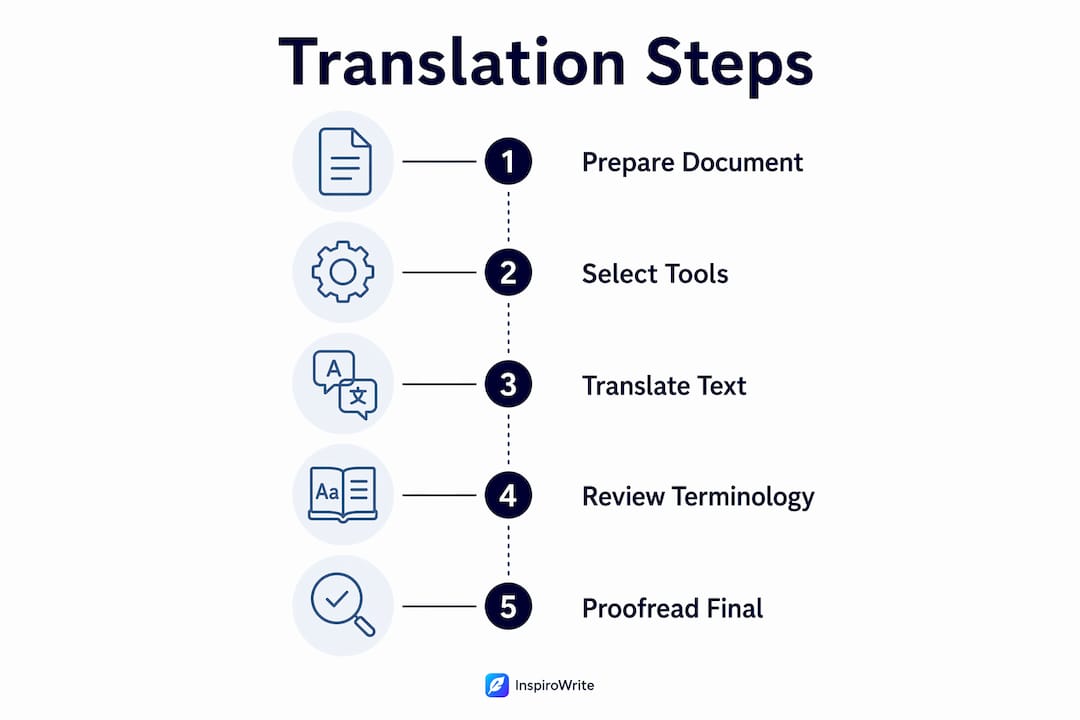
How to translate a report step by step
A structured approach prevents the most common errors in multilingual report conversion. Follow these steps in order.
-
Audit your source document. Check the file format, length, and content type. Identify whether the report contains tables, charts, embedded metadata, or hyperlinks. Each element needs specific handling during translation.
-
Choose your translation method. Three options exist: direct machine translation, machine translation with translation memory, or machine translation followed by human review. Direct machine translation is fastest but least reliable for technical content. Translation memory stores previously approved translations and applies them consistently across a long report. Human review adds accuracy but increases turnaround time.
-
Prepare the file. Convert PDF files to DOCX. Remove tracked changes and comments. Flatten any embedded objects that the translation engine cannot read. Save a clean copy before uploading.
-
Select your tool and upload. Match the tool to your project size. Use a free online platform for short reports. Use an enterprise API with cloud storage for batch projects. For structured data reports, export text strings to CSV first and translate them separately.
-
Run the translation. For synchronous tools, the output arrives within seconds or minutes. For asynchronous batch jobs, monitor the cloud storage queue and allow for processing time based on file volume.
-
Import and check formatting. Open the translated file and compare it side by side with the source. Check that tables have not collapsed, that headers are in the correct position, and that fonts have not reverted to defaults.
-
Verify linguistic accuracy and metadata. Final verification covers linguistic accuracy, layout consistency, and preserved features such as hyperlinks and metadata. Skipping this step is the single most common cause of errors in professional document translation.
Pro Tip: Run the translated document through a grammar and style checker in the target language before submitting. This catches awkward phrasing that machine translation produces even when the meaning is technically correct.
How do you manage technical terminology in translated reports?
Technical and business language does not translate literally. A phrase that reads clearly in English may produce a confusing or even misleading result in French, German, or Japanese when translated word for word. This is where most automated report translation fails without additional support.
Idiomatic translation, where AI rephrases for natural flow rather than word-for-word equivalence, is the accepted standard for professional output. Tools that advertise context-aware AI produce more natural results than those that apply direct substitution. The difference is most visible in executive summaries and conclusions, where tone and register matter as much as accuracy.
Three resources improve technical accuracy significantly.
- Custom glossaries define how specific terms must appear in the target language. A glossary entry for "net present value" ensures the term appears consistently as "valour actually netted" in French rather than varying across sections. The role of glossaries in multilingual content is well established for exactly this reason.
- Translation memory stores approved translations from previous projects and applies them automatically. This is particularly useful for organisations that produce recurring reports, such as quarterly financial summaries. A translation memory guide explains how to build and maintain one effectively.
- Subject matter expertise provides the human judgement that machines lack. A translator with a finance background will recognise that "leverage" in a balance sheet context means something different from "leverage" in a strategy document. Subject matter expertise in translation is not optional for high-stakes reports.
Idioms are a particular risk. Phrases like "bottom line" or "ballpark figure" have no direct equivalents in many languages. Why idioms fail direct translation is a documented problem that affects business reports more than any other document type, because business English is saturated with figurative language.
What goes wrong when translating reports, and how do you fix it?
Formatting disruption is the most visible problem after translation. Tables shift, bullet points lose indentation, and page breaks appear in the wrong places. This happens most often when translating from PDF rather than DOCX. The fix is to always start with an editable source file.
Batch processing errors are a separate category of problem. Choosing the wrong processing method for large volumes leads to technical failures and integration complexity. If a batch job fails partway through, check whether the file size exceeded the platform limit and whether cloud storage permissions were correctly configured.
"Over-reliance on literal machine translation without idiomatic adjustment is the leading cause of rejected translations in academic and professional settings. A document that is technically accurate but reads unnaturally will fail peer review and damage credibility with international partners."
Inconsistent terminology is a subtler problem. When a report uses "revenue" in one section and "income" in another, a machine translator may render these as different terms in the target language, creating the impression of two separate concepts. A custom glossary and a post-translation terminology audit resolve this.
File size and language compatibility limits catch many professionals off guard. Some platforms cap uploads at a specific file size or do not support certain language pairs at the same quality level. Check compatibility before committing to a tool for a critical project. For business translation errors that go beyond formatting, a structured review checklist is the most reliable safeguard.
Key takeaways
Accurate multilingual report conversion requires the right file format, a matched tool for project scale, and a final verification step covering language, layout, and metadata.
| Point | Details |
|---|---|
| Start with DOCX, not PDF | Native DOCX files preserve formatting far better than PDFs during translation. |
| Match tool to project size | Use free online tools for short reports; use batch APIs with cloud storage for large volumes. |
| Use glossaries and translation memory | Custom glossaries and stored translations keep terminology consistent across long reports. |
| Idiomatic translation beats literal translation | Context-aware AI tools produce more natural output than word-for-word engines. |
| Always verify the final output | Check linguistic accuracy, layout integrity, and metadata before submitting any translated report. |
What I have learned from translating reports across languages
My honest view is that most professionals underestimate the gap between a technically correct translation and a professionally usable one. I have reviewed translated reports where every word was accurate but the document read like it had been assembled from a dictionary. That kind of output fails in practice, regardless of how sophisticated the tool was.
The combination that works is machine translation for speed, followed by human review for register and tone. This is not a new idea, but it is consistently the approach that produces documents you can actually submit or share. Combining machine translation with human review produces the best results by balancing speed with natural language flow.
For academic reports, the stakes are particularly high. A mistranslated methodology section can invalidate findings in the eyes of a reviewer. For business reports, a poorly translated executive summary signals carelessness to international partners before they have read a single data point.
My recommendation is to treat translation as a two-stage process, not a single action. Run the machine translation, then read the output aloud in the target language. Anything that sounds unnatural to a native speaker needs revision. That simple test catches more errors than any automated checker.
For technical reports with embedded data, do not skip the CSV export step. Metadata that sits inside charts or dashboards is invisible to standard translation engines. Translating it separately and reimporting it is the only reliable method.
— Mike
Inspirowrite: translation and proofreading support for your reports
Producing a polished translated report takes more than a single pass through a translation engine. Inspirowrite offers AI-powered translation and proofreading that delivers results within seconds, without storing your content or using it to train AI models.
Whether you are a student preparing an academic submission or a professional preparing a report for an international audience, Inspirowrite handles both translation accuracy and language quality in one place. Privacy is built in by design, so confidential business data stays confidential. Visit Inspirowrite to see how it supports your next multilingual document project.
FAQ
What does it mean to convert a report into a second language?
Converting a report into a second language means translating the full document into a target language while preserving its original structure, formatting, and meaning. The process is formally called document translation and covers text, tables, metadata, and embedded elements.
Which file format works best for report translation?
DOCX produces the best results because it retains fonts, styles, tables, and headers during translation. PDF files should be converted to DOCX before uploading to any translation tool.
How do I handle technical terms when I translate a report?
Use a custom glossary to define how specific terms must appear in the target language, and apply translation memory to keep those terms consistent throughout the document. For high-stakes reports, a subject matter expert should review the output.
What is the difference between synchronous and asynchronous translation?
Synchronous translation processes a single file immediately and returns the result in real time. Asynchronous translation handles large batches via cloud storage and is suited to reports exceeding 100 pages, such as annual financial reports.
Can free tools handle professional report translation?
Free tools such as GroupDocs Translation support 46 languages and preserve formatting for small to medium files, making them suitable for reports under 50 pages. For large volumes or technical reports with embedded metadata, enterprise-grade batch tools are necessary.