

TL;DR:
- AI translation tools can convert business presentation slides into multiple languages in just minutes, greatly enhancing efficiency. Using a single English master file and glossary injection ensures consistency and accuracy across all translations, especially for technical terms. Human review remains essential for high-stakes content to capture cultural nuances and ensure precise messaging.
Translating business presentation slides is the process of converting slide text, labels, and speaker notes into one or more target languages while keeping the original layout, fonts, and brand identity intact. AI-powered translation tools have reduced what was once a manual, multi-hour task to a matter of minutes. Manual translation of a 30-slide deck typically takes 2–4 hours, whereas AI completes the same job in roughly 3 minutes with formatting preserved. That efficiency gap changes how global teams plan their content calendars. This guide covers the tools, workflow, and best practices business teams need to produce professional multilingual presentations at scale.
What tools do you need to translate business presentation slides?

The right toolset determines whether your slide deck translation is a one-off chore or a repeatable workflow. At minimum, you need a presentation file in an editable format, an AI translation platform or add-on that supports your target languages, and a clear file management system.
Supported file formats
AI translation platforms work with the three dominant formats: Microsoft PowerPoint (.pptx), Google Slides, and Apple Keynote. PowerPoint is the most widely supported across enterprise-grade tools. Google Slides benefits from browser-based add-ons that translate directly within the editor. Keynote files often require export to .pptx before processing, so factor that step into your timeline.
Key feature categories to evaluate
Not all translation tools handle slides equally. When assessing options, compare across these four categories:
- Language coverage. Modern AI tools support 50 to 280+ languages, which matters when your business operates across multiple regions simultaneously.
- Glossary injection. This feature lets you upload a list of approved terms, brand names, and product labels so the AI never mistranslates them. It is critical for SaaS, legal, and medical presentations.
- Formatting preservation. The tool must retain colours, fonts, images, charts, and slide structure. AI tools that preserve brand assets eliminate reformatting time entirely.
- Auto-layout adjustment. Some languages expand text significantly after translation. A tool without automatic text fitting will break your slide design.
| Feature category | Why it matters |
|---|---|
| Language coverage | Determines which markets you can serve without switching tools |
| Glossary injection | Protects brand and technical terms from mistranslation |
| Formatting preservation | Keeps slides presentation-ready without manual redesign |
| Auto-layout adjustment | Handles text expansion or compression across languages |
| Review and export options | Allows native speaker checks before final distribution |
Pro Tip: Duplicate your master deck before loading it into any translation platform. Work only on the copy. Your original English file is your single source of truth for all future updates.
Step-by-step workflow for translating slides with AI
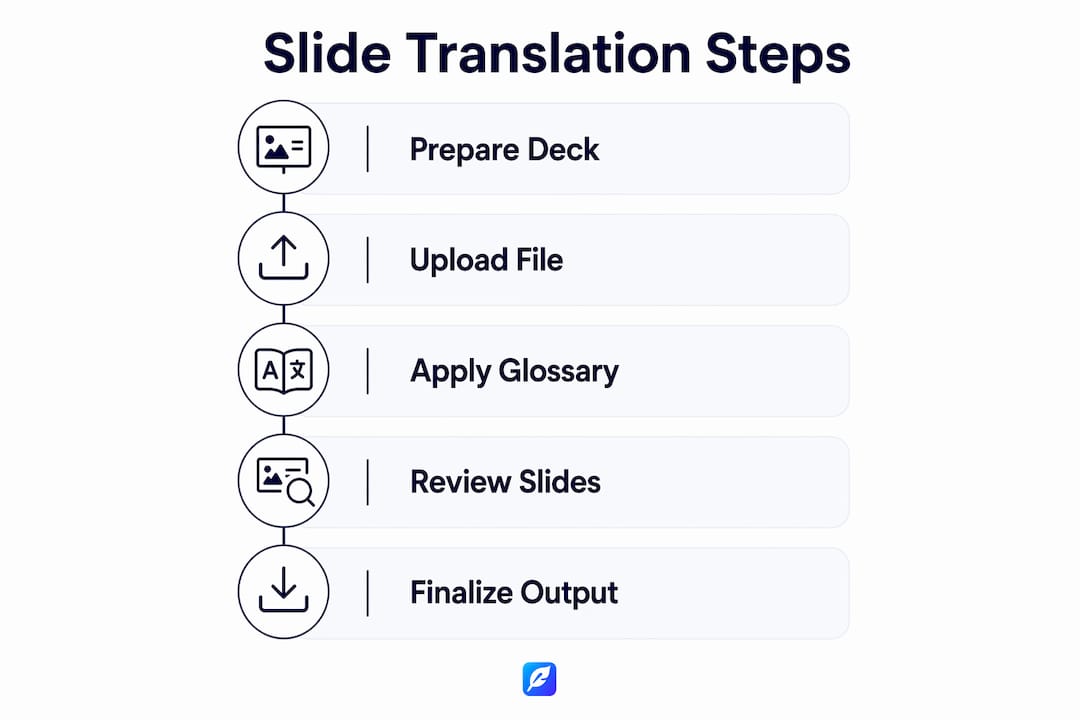
A consistent workflow prevents errors and makes re-translation fast when content changes. Follow these five steps for every project.
-
Duplicate the master deck and name it by target language. Create a copy of your English source file and label it clearly, for example "Q3-Sales-Deck-DE" for German. Never translate directly in the master file.
-
Load your AI translation add-on or platform. Open the duplicated file in your chosen tool. If you use a browser-based platform, upload the .pptx file directly. For Google Slides, install the relevant add-on from the Workspace Marketplace.
-
Select slides and choose the target language. Most platforms let you translate the full deck or individual slides. Select all slides unless you have slides that contain no translatable text, such as pure image slides.
-
Execute the translation. The AI processes each text box, preserving position, font size, and colour. AI-powered translators complete this step in minutes, not hours, and the output is ready for review rather than reformatting.
-
Review key slides for brand, tone, and terminology. Focus your manual review on the title slide, executive summary, pricing slides, and any slide containing product names or regulatory language. These carry the highest risk of tone or terminology errors.
Pro Tip: Create a "review priority" list before you start. Mark the five to eight slides that carry your core message or contain technical terms. Review those first. If they pass, the rest of the deck rarely needs more than a light check.
The workflow above applies equally to translating PowerPoint slides for a board presentation and to localising a sales deck for a regional team. The steps do not change; only the glossary and review depth vary by audience.
How to handle language-specific challenges in translated slides
Linguistic accuracy is only half the problem. Layout integrity and cultural tone are where most business presentation translations fail.
Text expansion and layout breaks
German translations expand text length by approximately 30% compared to English. Spanish and French also expand, though typically less. Russian and Chinese compress. These shifts break text boxes, push content off slide boundaries, and misalign charts. AI tools with automatic text fitting resize fonts or reflow text to compensate. Without this feature, every translated slide requires manual adjustment, which defeats the purpose of using AI.
The practical fix is to choose a platform with auto-layout as a core feature, not an optional add-on. After translation, scan each slide at 100% zoom. Any text that overflows a box or sits outside the slide boundary needs a font size reduction or a text box resize.
Glossary injection for industry-specific terms
Glossary injection is the single most effective way to protect technical terminology in translated slides. You upload a spreadsheet of source terms and their approved translations. The AI then locks those terms during processing. This matters most in three sectors:
- SaaS and technology. Product feature names, API references, and UI labels must remain consistent across all language versions.
- Legal and compliance. Regulatory terms carry precise meanings. A mistranslation in a compliance deck can create liability.
- Medical and pharmaceutical. Drug names, dosage instructions, and clinical terms require exact equivalents, not approximations.
AI translation achieves over 90% accuracy for standard business decks. Presentations with highly specialised content require glossary injections or manual review by native speakers to close the remaining gap.
Cultural tone and persuasive intent
A literal translation of a persuasive sales deck often loses its impact. The sentence structure, formality level, and rhetorical style that work in English do not map directly to German, Japanese, or Arabic. Loss of cultural nuance is a primary failure point in business deck localisation. The best AI models rephrase for idiomatic naturalness rather than translating word for word. When reviewing translated slides, read each bullet point aloud in the target language if you can, or ask a native speaker to assess whether the slide still persuades rather than merely informs.
Pro Tip: For high-stakes presentations such as investor decks or regulatory submissions, always commission a native speaker review of the final translated file. AI handles the heavy lifting; a human reviewer catches the nuance.
Troubleshooting common issues and scaling multilingual decks
Even with a solid workflow, problems arise. Knowing how to fix them quickly keeps projects on schedule.
The most common issues in slide deck translation are:
- Broken text boxes. Text overflows its container after expansion. Fix by reducing font size by one or two points, or widening the text box if the slide layout permits.
- Mistranslated business phrases. Idioms like "low-hanging fruit" or "move the needle" translate literally and confuse non-English audiences. Review common mistranslated phrases before finalising any deck.
- Inconsistent terminology across slides. The same product name appears in two different forms across the deck. Glossary injection prevents this, but a find-and-replace check after translation catches any that slip through.
- Font substitution. Some fonts do not support non-Latin scripts. If your brand font lacks Cyrillic or Arabic glyphs, the platform substitutes a default font. Resolve this by embedding a compatible font before translation.
For teams managing multilingual business documents across multiple markets, the single most effective scaling strategy is the single English master file. Maintaining one master source file keeps global teams aligned and simplifies updates. When a slide changes, you update the English master and re-translate only the affected slides, not the entire localised deck.
Top teams treat deck translation as a recurring workflow integrated into quarterly content cycles. They schedule translation as a fixed step after each content update, not as a reactive task when an international meeting appears on the calendar. This approach cuts turnaround time and prevents markets from operating on outdated slide versions.
Key takeaways
AI translation is the fastest and most format-safe method to produce multilingual presentation slides, provided teams use glossary injection, maintain a single English master, and review high-stakes slides with native speakers.
| Point | Details |
|---|---|
| AI speed advantage | AI translates a 30-slide deck in minutes versus 2–4 hours manually. |
| Single master file | Keep one English source deck and generate translated copies from it. |
| Glossary injection | Upload approved terms to prevent mistranslation of technical or brand language. |
| Layout adjustment | Choose a tool with auto-text fitting to handle expansion in languages like German. |
| Native speaker review | Commission human review for investor decks, legal slides, and regulatory content. |
Why AI has changed how I think about slide localisation
I used to treat presentation translation as a one-off task. A conference in Berlin meant a frantic 48-hour sprint to get slides into German, usually involving a freelance translator, three rounds of email, and a layout rebuild that took longer than the translation itself. The result was rarely consistent with the English original.
AI translation tools changed that entirely. The speed is obvious, but the real shift is structural. When translation takes minutes rather than days, it stops being a bottleneck and becomes a standard step in the content process. Teams that have made this shift do not ask "do we have time to translate?" They ask "which markets need this update this quarter?"
The one thing I would caution against is over-relying on AI for high-stakes content without a review step. AI handles standard business language well. It handles technical jargon in specialist fields less reliably without a glossary. The combination of AI speed and human review is where the real quality sits. Neither alone is sufficient for presentations that carry commercial or regulatory weight.
— Mike
Inspirowrite for business translation and document accuracy
Business teams that need fast, private, and accurate translation for presentations and documents will find Inspirowrite built for exactly that use case.
Inspirowrite delivers AI-powered translation and proofreading in seconds, with a firm commitment to user privacy. Your content is never used to train AI models, which matters when slides contain commercially sensitive data. The platform handles multilingual business workflows without the slow turnaround of traditional translation services. Teams can review, correct, and finalise translated content within a single session. For full details on how Inspirowrite protects your data during translation projects, see the privacy policy. Visit Inspirowrite to get started.
FAQ
How long does it take to translate a business presentation with AI?
AI-powered tools translate a 30-slide deck in approximately 3 minutes, compared to 2–4 hours for manual translation. The output includes preserved formatting, so no redesign is needed.
What file formats work with AI slide translation tools?
Most AI translation platforms support Microsoft PowerPoint (.pptx) and Google Slides natively. Apple Keynote files typically require export to .pptx before processing.
How do I keep technical terms accurate in translated slides?
Use glossary injection to upload a list of approved terms before translation. Glossary injection in AI translators prevents the AI from substituting or paraphrasing specialist language in legal, medical, or SaaS presentations.
Why does my translated slide text overflow the text box?
Text expansion is the cause. German, for example, expands text by roughly 30% after translation. Choose a platform with automatic text fitting, or manually reduce font size by one to two points in affected slides.
How do I manage updates across multiple translated decks?
Maintain a single English master file and generate translated copies from it. When content changes, update the master and re-translate only the revised slides rather than rebuilding every localised version.